Companies no longer judge field service teams only by how fast they close tickets. Customers now expect real-time updates, faster response times, and technicians who arrive fully prepared. According to Salesforce research, 74% of mobile workers say customer expectations for service speed and quality have increased. Mobile workers also spend only 32% of their time interacting directly with customers because too much time is still lost on manual admin work and disconnected systems.
Salesforce Field Service (Salesforce FSL) helps solve these problems by connecting scheduling, dispatching, mobile workforce management, asset history, inventory, AI, and customer data in one platform. Companies use Salesforce Field Service Management to automate dispatch operations, optimize technician routes, improve first-time fix rates, and give field teams access to real-time information through the Salesforce Field Service mobile app.
Organizations using modern field service management Salesforce software already report measurable operational gains. Companies implementing Field Service Salesforce and AI-powered automation have achieved a
- 31% increase in first-time fix rate,
- 32% increase in mobile worker productivity,
- 26% reduction in truck rolls,
- 27% decrease in new employee ramp-up time.
AI scheduling, predictive maintenance, and automation also help dispatchers reduce manual coordination and keep technicians focused on service delivery instead of paperwork.
At Noltic, we help companies implement Salesforce Field Service for complex service operations across manufacturing, logistics, telecom, utilities, and high-tech industries. As a Salesforce Summit Partner with 400+ certifications and hands-on experience across Service Cloud, Data Cloud, Agentforce, and enterprise integrations, we work with companies that need more than basic scheduling. Our focus is building scalable field service operations that improve technician productivity, reduce operational costs, and create faster, more reliable customer service.
What is Salesforce Field Service in 2026?
Salesforce Field Service is an AI-powered field service management platform built on Salesforce Service Cloud. What used to be just a scheduling tool before, now combines AI, automation, Agentforce, real-time mobile workflows, and predictive maintenance to help companies deliver faster and more reliable on-site service. AI-powered field service automation can automatically assign the best technician based on skills, location, availability, SLAs, and inventory availability while optimizing routes and reducing manual dispatcher work.
Modern Salesforce Field Service Lightning includes:
- AI-powered scheduling and dispatch optimization;
- Salesforce Field Service mobile app with offline access;
- Predictive maintenance and asset monitoring;
- Automated work summaries and technician guidance;
- Inventory and asset service management;
- Customer appointment tracking and notifications;
- Agentforce AI assistants for dispatchers and technicians;
- Real-time integration with ERP, CRM, IoT, and billing systems.
Salesforce continues expanding AI capabilities across the platform. Recent updates include voice-driven workflows for technicians, AI-generated pre-work briefs, automated rescheduling with Agentforce, and smarter field service scheduling automation.
For companies managing mobile teams, Salesforce Field Service helps reduce operational costs, improve first-time fix rates, increase technician productivity, and deliver faster customer support with full visibility across every field service operation.
How our client transformed their operations with Salesforce Field Service
A growing HVAC company in the New York metro area struggled with disconnected scheduling, manual dispatching, and limited visibility into technician availability. Dispatchers spent hours coordinating appointments by phone, technicians often arrived without complete job information, and customers faced inconsistent service windows.
The company needed a scalable field service management platform that could automate scheduling, improve technician productivity, and reduce delays across daily service operations.
How we approached the Field Service Salesforce implementation
We implemented Salesforce Field Service to centralize scheduling, dispatching, mobile workforce management, and billing workflows in one system. Using Salesforce Field Service Management, the company could automatically assign jobs based on technician skills, location, and availability while optimizing routes to reduce drive time and increase the number of completed appointments per day.
The Salesforce Field Service mobile app gave technicians real-time access to:
- Customer history;
- Work orders and service notes;
- Task instructions;
- Asset and equipment information;
- Travel and time tracking.
We also integrated Salesforce Field Service with Accounting Seed to automate invoicing and eliminate manual billing errors.
Business results with Salesforce for field service
The new Salesforce field service management solution helped the company:
- Reduce dispatcher workload through automated scheduling and field service automation;
- Improve technician utilization and complete more jobs daily;
- Provide more accurate arrival windows and faster service resolution;
- Automate billing with accurate travel and labor tracking;
- Lower overtime, fuel costs, and unnecessary truck rolls;
- Improve customer satisfaction with faster and more reliable field service operations.
How does Field Service Salesforce work?
FSL Salesforce (Field Service) simplifies field service management by automating many of the manual processes that companies traditionally handle themselves. Let’s use an appliance repair company as an example to show how FSL in Salesforce works. In this scenario, the company doesn't need to manually schedule technicians, track their locations, or manage parts inventory. Instead, Salesforce FSL does all the job:
- A customer calls in to report a broken refrigerator. The customer service representative creates a work order in FSL that includes the problem description, customer information, and the preferred service time.
- FSL Salesforce assigns the job to the nearest available technician. Based on the technician’s skills, availability, and current location, FSL automatically assigns the most qualified person to the job. This automation ensures faster response times and efficient resource utilization.
- The technician receives the job details on their mobile device. Once the job is assigned, the technician receives a notification directly in the app with all the necessary information: customer details, the reported issue, and any parts that might be required.
- The technician arrives at the customer's location. Field service app Salesforce tracks the technician’s route using built-in GPS, ensuring timely arrival. Upon arrival, the technician diagnoses the problem and begins the repair.
- The technician updates the work order on-site. Throughout the process, the technician can update the work order with notes on the repair, parts used, and job status from their mobile device, eliminating the need for paper records.
- Work order closure and reporting. After completing the repair, the technician closes the work order. Salesforce FSL automatically generates service reports and creates an invoice for the customer. Additionally, the company can track the technician’s performance, customer satisfaction, and parts usage through the system.
The main components of Salesforce Field Service
Salesforce Field Service brings everything together to make managing field service simple and effective. Let’s take a look at its key components:
- Core Features are the essential tools for handling work orders and scheduling services. They help assign tasks, set up appointments, and track progress, making it easy to manage everything in one place.
- Managed Package adds extra features on top of the core tools for easier customization and better process optimization. It includes a setup guide, a scheduling console, and an optimizer to make service management even simpler.
- Mobile App for Android and iOS helps mobile workers stay efficient on the go. Employees can update tasks, track job status, and gather customer information.
- Field Service APIs and Developer Tools provide resources like object diagrams, API access, and code samples to build custom applications and integrations with Field Service.
Salesforce Field Service features
To work with Field Service Salesforce, you need to use Standard Objects that are only available if Field Service is enabled, which can be done in the Field Service menu in the Setup section of your organization.
The main objects you will encounter while working with Salesforce FSL are:
Salesforce Field Service Lightning managed package
The FSL Salesforce package unlocks applications to effectively manage work, plan trips, and customize FSL functionality. Let’s take a closer look at what is included in a managed package:
- The guided setup tool simplifies creating Salesforce Field Service records and configuring settings.
- The dynamic scheduling console keeps track of all team members, scheduled meetings, and work tasks. Dispatchers can see the location of their team and distribute work based on up-to-date information.
- Scheduling optimization automatically allocates resources to scheduled meetings in the most efficient way. The optimizer notes workers' skill levels, travel time, location, and other factors to ensure optimal resource utilization.
- Scheduling policies and triggers create rules that define how work tasks are distributed and assigned to employees.
Salesforce Field Service app
The Salesforce Field Service mobile app is designed to optimize the work of mobile workers who go out on calls to perform work tasks and serve customers. Here are its main features:
1. Update work orders
Workers can review and update their work information, mark tasks as completed, update statuses, and add comments or attachments.
2. Inventory tracking
Workers can check the availability of goods, execute replenishment orders, and update information about using materials at the service site.
3. Collecting customer signatures
Employees can collect customer signatures to confirm the fact of service and avoid misunderstandings.
4. Dispatcher communication
Workers can send messages, notifications, and requests for advice to their managers or dispatchers.
5. Route and navigation
The application allows workers to build the best route to the task and use navigation to maximize efficiency and reduce travel time.
6. Offline mode
The application supports offline mode, meaning employees can continue working even without an internet connection. Data is synchronized as soon as network access is available.
7. User-friendly interface
The application's intuitive and easy-to-use navigation helps workers quickly learn it and work efficiently.
Salesforce Field Service APIs and developer resources
Field Service APIs and Developer Resources is a set of tools, resources, and application programming interfaces (APIs) that developers can use to extend, customize, and integrate Salesforce Field Service Lightning with other systems and applications. These resources make FSL Salesforce more flexible and usable in various business scenarios. Key aspects of the Field Service APIs and developer resources include:
1. API for data exchange
FSL Salesforce provides APIs for exchanging data between other systems and applications. Developers can use these APIs to import and export data, create extensions, and integrate with other solutions.
2. Documentation for developers
Field Service Lightning Salesforce has extensive documentation that includes API descriptions, use cases, and developer tips. Salesforce Field Service Lightning documentation helps developers understand how to use the API and other resources.
3. Object relationships
FSL in Salesforce implements object relationships that allow developers to set up relationships between different objects and create complex data for use in the system.
4. Code samples
Field Service APIs and Developer Resources provide sample code for various programming languages to help developers get up and running with the system quickly and use its functionality.
5. Support for integrations
Salesforce Field Service is designed to integrate with other popular platforms and systems, such as Salesforce CRM, IoT platforms, accounting systems, electronic cards, etc. This allows developers to implement and configure integrations with existing infrastructures easily.
6. Extension support
Field Service in Salesforce allows developers to create extensions, applications, and connections, which help companies adapt FSL Salesforce to their needs and extend its functionality.
Functions and capabilities of the Salesforce Field Service app
Salesforce Field Service management has a wide range of tools to organize work to ensure effective management of work tasks, schedules, and personnel:
- Employees management. You can create records for service representatives, dispatchers, and agents and add detailed information about their skills, location, and availability.
- Service territories. Salesforce Field Service management allows you to set up multi-level service territories that reflect the areas in which mobile workers can provide services.
- Resources status and location. You can track the location and status of your inventory, warehouses, company vehicles, and customer sites.
- Salesforce Field Service scheduling. You can create one-time or regular work orders for customers and add detailed information about worker requirements, skills, and parts needed.
- Creation of service plans and templates. You can create service plans and templates to standardize your service operations.
- Generation of service reports. You can generate service reports to notify customers about the progress of their services.
The benefits of Salesforce Field Service optimization
The benefits of using Salesforce for field service and maintenance businesses go beyond the minimal advantages:
Increased productivity and efficiency
Imagine a repair service using Salesforce Field Service app to distribute work orders among its technicians. Instead of wasting time figuring out who should go where, the system automatically assigns tasks based on location and availability. Technicians spend less time traveling and more time working, visiting more customers in a day.
Improved customer service
Clients benefit too. Picture a home appliance service company that can now give customers accurate information about when a technician will arrive for repairs. No more waiting around all day; customers get clear updates, which makes them happier and more likely to return for future services.
Efficient routing
For businesses that rely on travel, like a courier service, field service app Salesforce helps by optimizing routes. Drivers avoid traffic, cut down on fuel costs, and make timely deliveries. It's a win for both efficiency and cost savings.
Faster communication
Salesforce for field service also facilitates communication between mobile workers and dispatchers. An installation company, for example, can send job details directly to their workers' phones and get instant updates on progress. Everything happens in real-time, so there’s no need for back-and-forth calls or delays.
Asset and inventory tracking
Finally, Salesforce Field Service Cloud keeps track of assets and inventory. Think of an equipment manufacturer that needs to monitor the condition of machinery at various service points. With FSL, they know exactly what’s where, what needs maintenance, and can schedule repairs before issues become problems.
Salesforce Field Service implementation guide from our team
Getting Field Service Salesforce right isn't just about ticking configuration boxes. It's about fundamentally reshaping how your service operations run.
Why process come before the platform
Too many organizations dive headfirst into the technical setup and wonder why adoption feels forced. The reality? The Salesforce Field Service app performs best when it's built around your actual workflows, not theoretical ones.
Before touching a single setting, map out your current reality:
How do work orders actually flow from that first customer call to final invoicing? Who's responsible at each stage, and where do requests typically get stuck? Which handoffs between teams create the biggest delays?
Getting clear on these fundamentals means your final configuration will feel natural to your technicians instead of fighting against their instincts.
The big decisions that determine everything else
Some choices early in your implementation will ripple through every other aspect of your system:
- Are you tracking what people can do based on formal certifications, years of experience, or specific equipment they're trained on? This choice directly impacts how dispatch works and whether you can scale efficiently as you grow.
- Do your technicians work standard shifts, or do you need the flexibility to adjust availability based on demand patterns? The wrong approach here kills both coverage and utilization.
- Make them too large, and dispatch becomes a nightmare. Too small and you lose scheduling flexibility. Finding the sweet spot is crucial for meeting customer expectations and service commitments.
What usually goes wrong (and how to avoid it)
- Overcomplicating the scheduling engine
Yes, Salesforce Field Service optimization capabilities are impressive, but complexity for its own sake backfires. Begin with straightforward rules and add sophistication as you understand your data better.
- Ignoring the mobile experience
If the app feels clunky or unreliable, field teams will find workarounds that defeat the entire purpose. Think about offline functionality, screen layouts, and step-by-step guidance from day one.
- Treating integrations as an afterthought
Field service doesn't exist in a vacuum. When FSL can't talk to your ERP, inventory systems, or asset databases, you create information silos that only become apparent when everything's already live.
A Salesforce Field Service rollout approach that actually works
Rather than attempting everything at once, we've found success with a measured three-phase approach:
- Phase 1 - Foundation
Get the core pieces working: Work Orders, Service Appointments, and mobile functionality. This gives your team something tangible to work with while you gather real-world feedback.
- Phase 2 - Intelligence
Layer in smart scheduling, automated dispatch logic, and custom workflows based on what you've learned from actual usage patterns.
- Phase 3 - Integration
Connect asset management, third-party systems, and predictive capabilities to create a comprehensive field service ecosystem that grows with your business.
Salesforce Field Service configuration options
To configure FLS correctly and use its resources to the fullest, you need to enable it in your setup and install the FSL package. Just follow these steps in our Salesforce Field Service guide:
1. Enabling the Field Service option
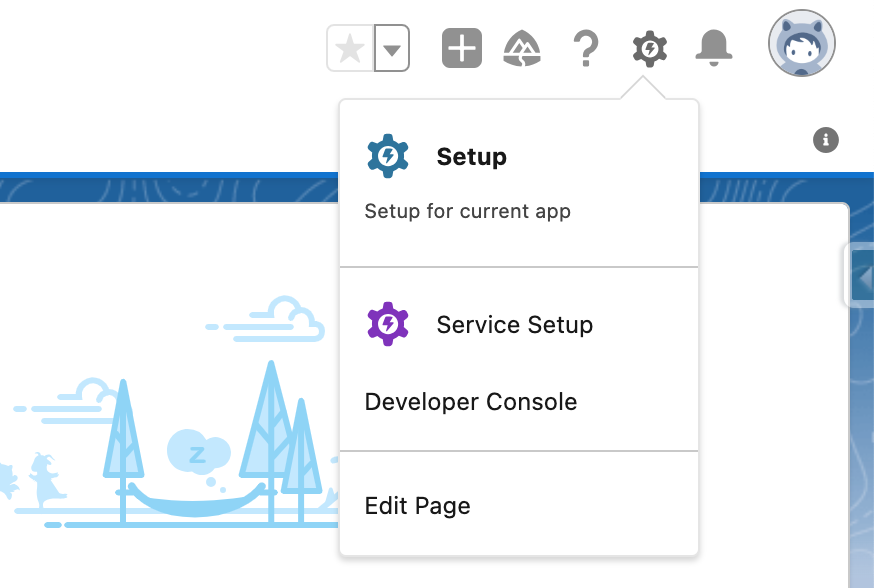
To enable Field Service, you need to go to Setup.
In the search menu, enter Field Service.
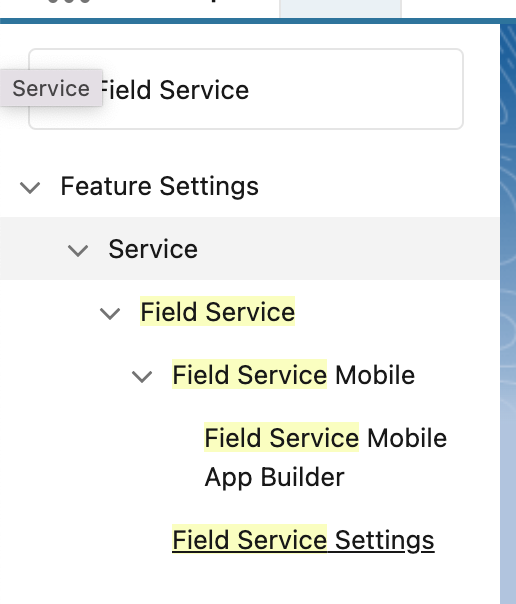
Go to the Field Service Settings menu.

Switch Field Service to the Enabled position and wait for the download and notification of successful activation.
After that, you will have basic objects to work with FLS, such as Work Orders, Service Appointment, and others.
2. Installing the Field Service package
Follow the link https://d36000000z1fneac.my.salesforce-sites.com/install. Select the type of organization in which you want to install the package.
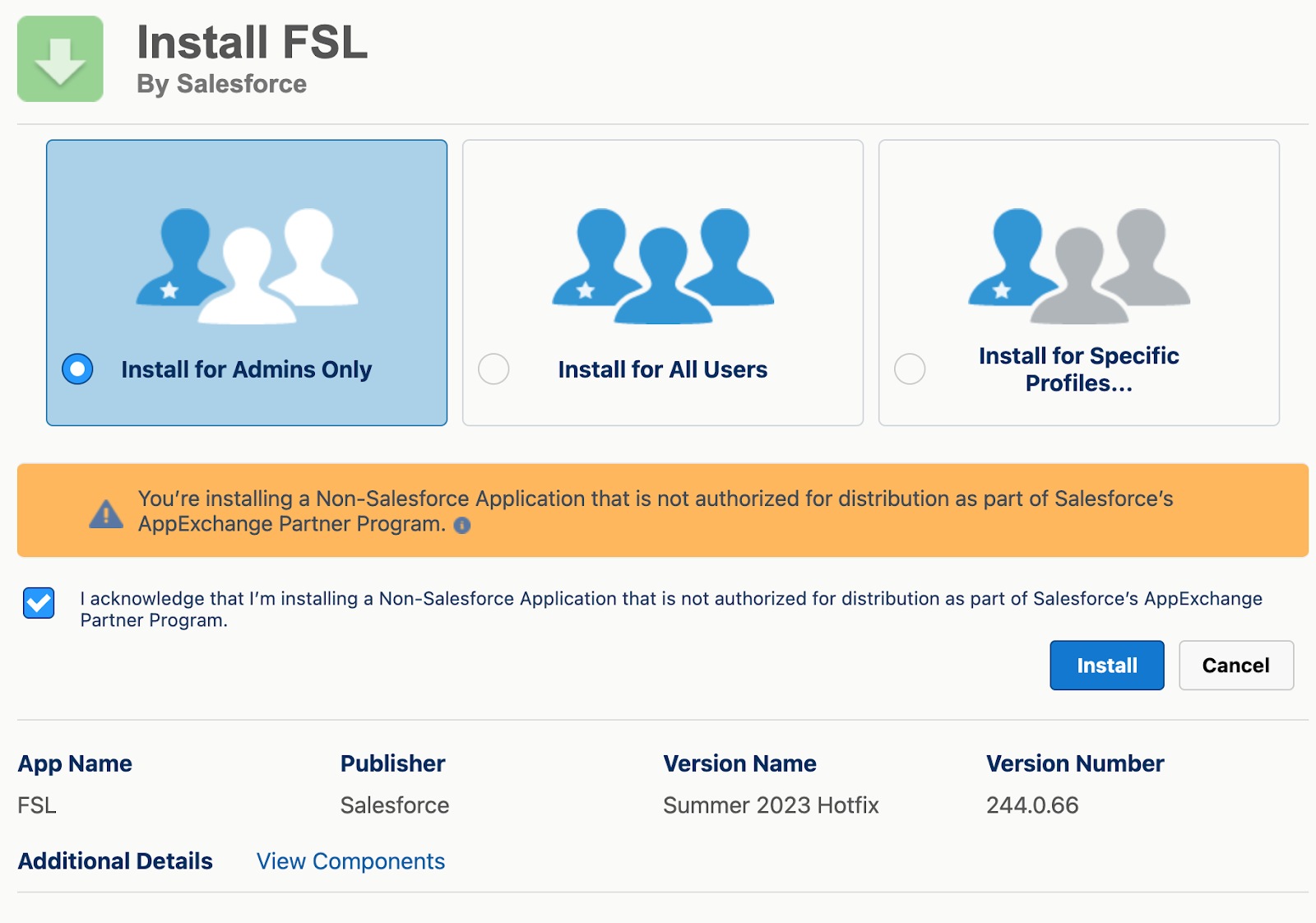
Select "Install for Admins Only" and agree to the terms and conditions, then click Install.
Agree to Third-Party Access, and complete the installation.
When the package is installed, you will receive an email notification about the installation status, and will be able to use the Field Service applications.

3. Permission sets
When the package is installed, you can create permalinks to work with FSL.
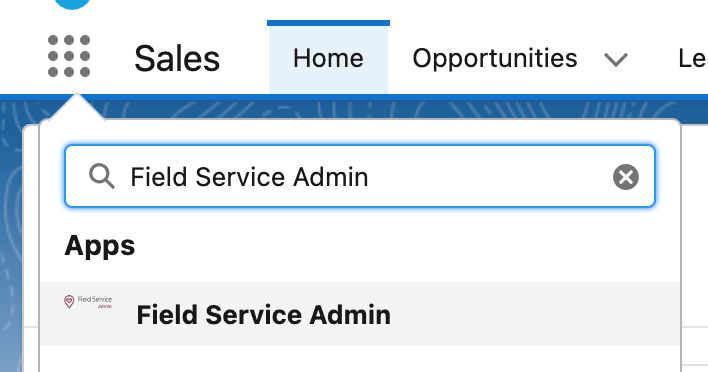
To do this, go to the Field Service Admin application in the App Launcher.
Go to the Field Service Settings tab, and then open the Permission Sets tab in the Get Started section.
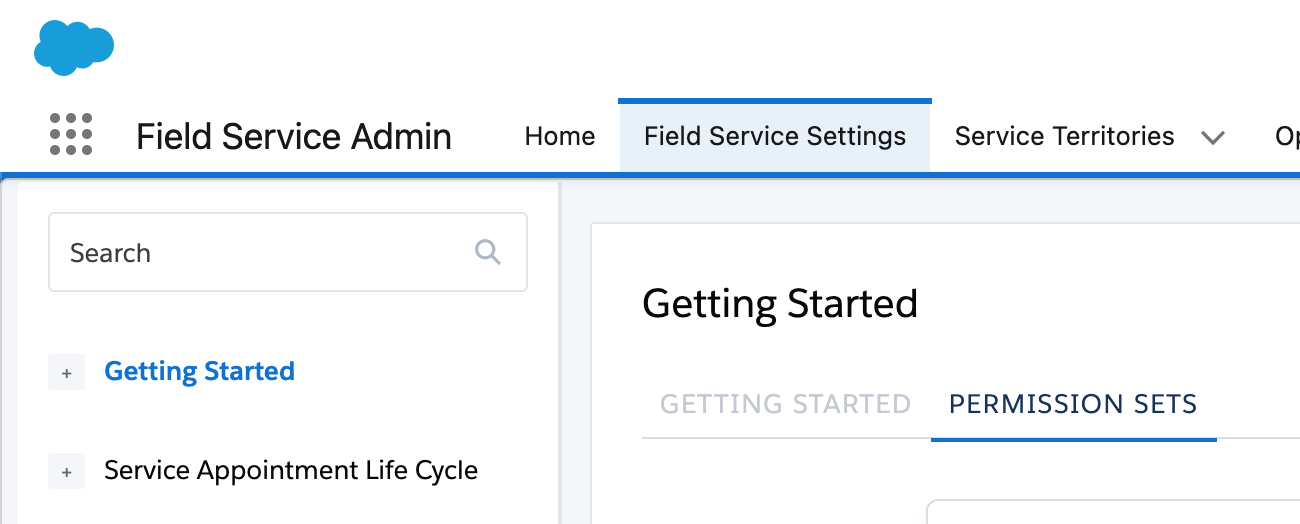
Now you just need to click Create Permission Set on each set and wait for them to be created.
Once you have created Permission Sets, you can go to Permission Sets in the Setup menu and assign the appropriate networks to corresponding users.
The table below contains information on what each permissions set is responsible for and to whom it is assigned.
Salesforce Field Service basic settings (Guided Setup)
Now that we have the accesses set up, we can proceed to the basic settings.
To do this, go to Field Service Settings as in the previous section. Click Go to Guided Setup.
The following steps will be presented to you:
- Create Service Territories. This defines the geographical areas where services are provided. The boundaries and parameters of each territory are set.
To create a new territory, specify its name and click Add. By clicking on the appropriate territory, you can change the name, specify the geographical address, and determine the hours of service. For more detailed settings, you can go to Open Service Territory Record.
- Create Work Types and Skills. It defines different types of services and work with the skills and qualification requirements.
By entering a name and clicking Add, you will create a new Work Type. You can specify what skills are required to perform this type of work and how long it can take. You can also choose whether to automatically create a Service Appointment if a Work Order with the corresponding Work Type is created.
- Create Service Resources. This is where the employee data, their skills, work schedules, and other important parameters are defined.
To set up dispatchers and agents, you should first create appropriate users for them and assign them to the corresponding primary networks. After that, you can choose to select this user in this menu, select the territory for which they will perform work, and choose a scheduling license, a mobile license, or both.
- Create Dispatchers and Agents. This is where you set access rights and functional responsibilities.
Here, by analogy with the previous paragraph, you select a user who will be a dispatcher or agent, and create an account for them.
- Customize Appointment Booking. You can create a custom online booking system for customers with types of services, dates, and times for booking specified.
You can select the rules by which the booking will be made, choose which schedule to work on, and create a new schedule that can be assigned to the Service Territory.
- Customize Scheduling Policies. This is where you define the rules for distributing service requests, such as limiting the number of requests per service desk, setting the priorities and automatic selection of an employee based on availability and skills.
By entering a name and clicking Add, you will create new rules for the distribution of requests. You can choose which of the following rules will be responsible for request distribution, and you can also select a priority for each service goal.
Custom scenarios
Salesforce Field Service is very well suited for use in many industries, the main feature of which is on-site work. Here are a couple of examples of how FSL can be applied in practice.
- Technical support services: Companies that provide technical support for electronics can use FSL to create work requests, assign technicians to specific customers, and track the status of work.
- Equipment maintenance: Companies responsible for servicing and repairing equipment (e.g., appliances, elevators, medical equipment) can use FSL to plan and execute on-site maintenance.
- Assembly and installation: Companies that assemble and install products (e.g. solar panels, kitchen appliances) can use FSL to optimize installation schedules and track the progress.
- Repair and construction services: Companies that provide building repair or construction services can use FSL to plan and execute work, manage resources, and control the quality of tasks.
- Household services: Businesses that provide household services (examples: waste disposal, gas heating service) can use FSL to optimize service schedules and routes.
- Customer service and maintenance for corporate clients: Businesses that provide customer service and maintenance for corporate clients can use FSL to schedule appointments, perform duties, and maintain service logs.
Having looked at the basic settings of FSL, we can now start to see how it can be used.
How a typical Salesforce Field Service workflow looks in practice
After setting up the platform, the day-to-day work in Salesforce Field Service revolves around managing Work Orders and Appointments. Here’s how a typical service workflow unfolds:
Work Order creation
The entry point for working with Salesforce FSL is Work Order. Therefore, everything starts with its creation. FSL provides the ability to automatically generate Work Orders using the Maintenance Plan. This allows you to carry out scheduled maintenance of equipment. We will look at how to create a Work Order manually.
Go to the Work Orders tab and click the New button.

In the pop-up window, specify the Service Territory, Work Type, Account, and Subject.

Now we can work with this order and set up an appointment on the spot.
Book Appointment
Go to the Feed tab and select Book Appointment.
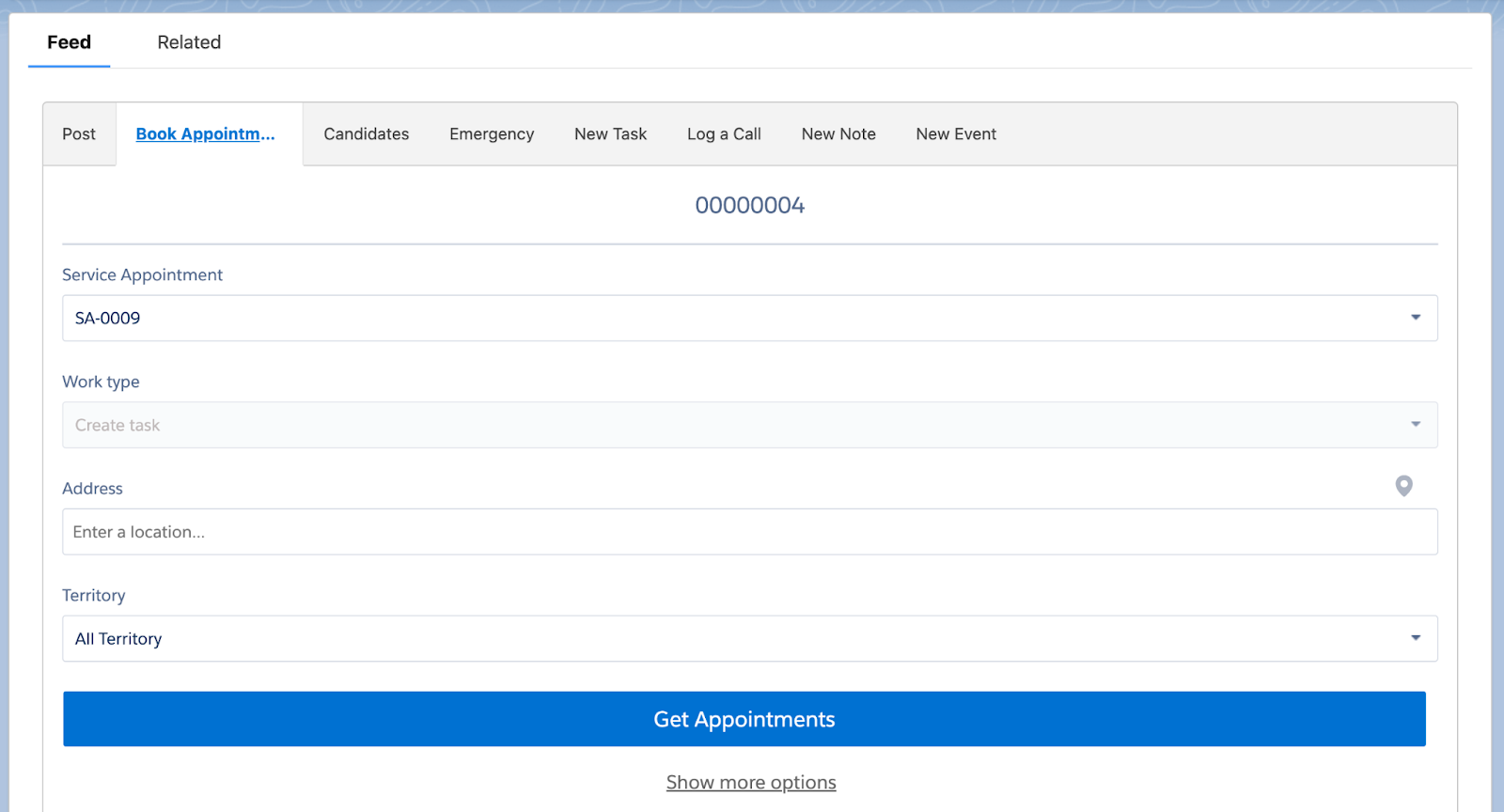
Enter the address and click Get Appointment.
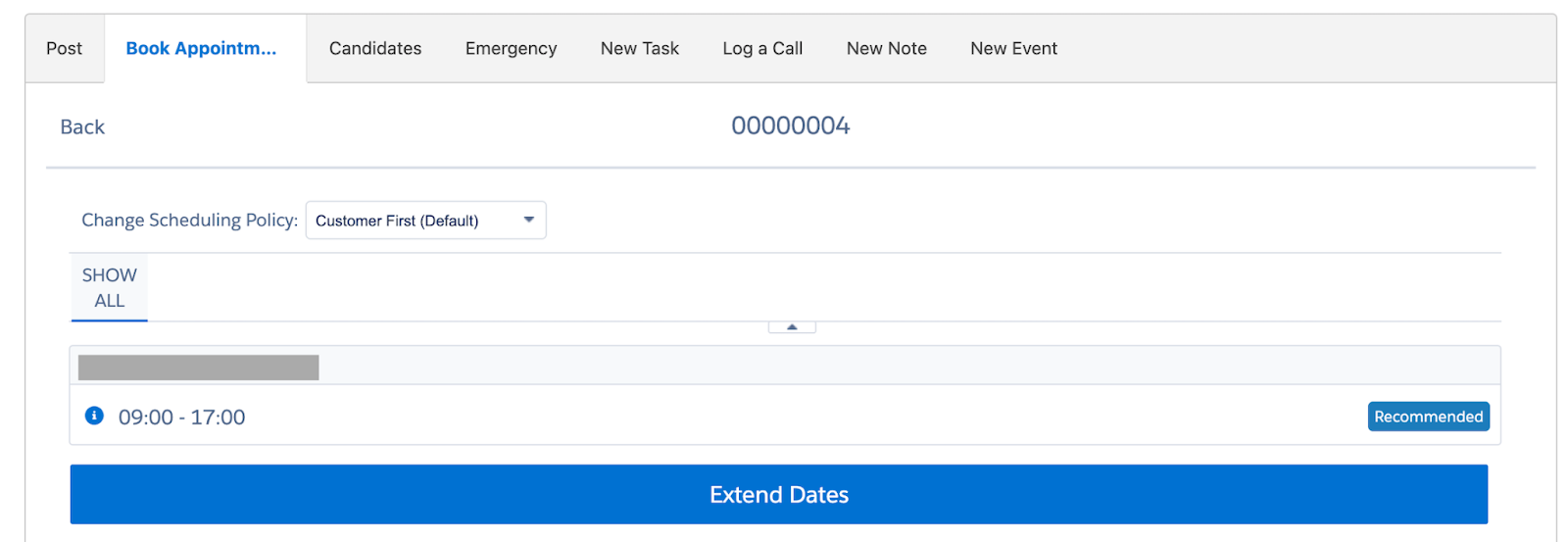
On this screen, select the slot in which you want the work to be performed. After that, an appointment will be created, and you'll be able to see it in the Work Order worklist.
Schedule Appointment
The next step is to assign an employee to perform a service call. You can do this by going to the Service Appointment object, specifying the time of execution, and adding Assigned Resources to the worklist. But it's easier and more convenient to do it through the Field Service App.
Go to the Field Service App.

Select the Appointment you want to work with and click Schedule to have it assigned.

After that, the employee will be able to see the appointment and fulfill it using the mobile application.
Work from app
Now that the employee has an appointment assigned to them, let's see how it works from the employee's point of view.
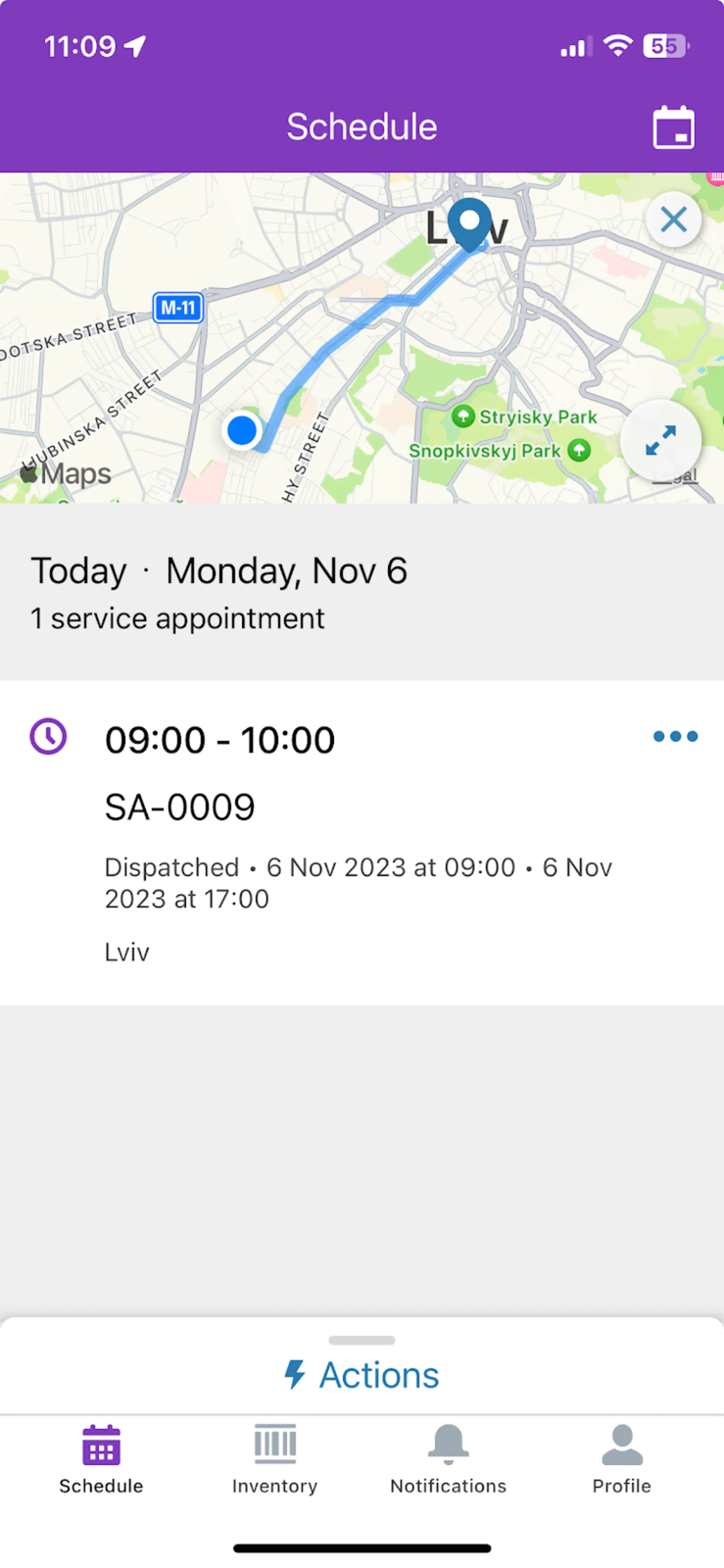
On the main screen of the application, after you log in, you see the current appointments for today, and you can use the calendar to view all of your appointments.
Your location and the appointment destination are also immediately indicated. You can view the details by clicking on the corresponding appointment.
The mobile app has a lot of flexibility in terms of customization. For example, you can set it up so that when you reach your destination, you are prompted to change the status to In Process and when you leave to Complete.
Salesforce Field Service + Analytics: how to turn operational data into insights
Most field service organizations collect massive amounts of operational data but struggle to extract real value. High-performing teams distinguish themselves by using analytics to drive strategic decisions rather than just tracking basic metrics.
Key performance indicators that drive results:
- First-time fix rates reveal more than technician effectiveness. They expose training gaps, parts availability issues, and systemic problems before they damage customer relationships.
- Job completion times analyzed across service types and regions help identify process bottlenecks and resource allocation needs.
- Customer satisfaction scores become powerful when correlated with operational data, showing which factors actually drive positive customer experiences.
Actionable analytics dashboards
Effective field service analytics focus on enabling immediate action, not just displaying information:
- Technician utilization dashboards reveal workload distribution patterns, helping managers balance assignments and prevent burnout while maximizing productivity.
- SLA compliance tracking by customer type and region surfaces performance trends before they impact renewals or satisfaction scores.
- Capacity forecasting compares projected job volumes with actual completion rates, informing hiring and resource decisions before constraints affect service delivery.
Field Service Lightning pricing and editions in 2026
Salesforce Field Service pricing depends on the type of user, required features, and Salesforce edition. The platform uses role-based licenses, allowing companies to combine dispatcher, technician, contractor, and AI-powered field service licenses within the same environment.
Editions and roles
Enterprise Edition pricing, billed annually:
What each Salesforce Field Service license includes
- Dispatcher: scheduling console, optimization tools, territory management, and resource coordination
- Technician: Salesforce Field Service mobile app, work orders, offline access, inventory, and asset management
- Contractor / Contractor Plus: controlled access for third-party field workers
- Field Service Plus: combines Salesforce Service Cloud and Salesforce Field Service capabilities in one license
- Agentforce 1 Field Service: adds AI-powered scheduling, predictive maintenance, automation, and Agentforce capabilities
Salesforce Field Service requires at least one Service Cloud license. Companies using field technicians and contractors also need at least one Dispatcher license to access the scheduling and dispatch tools.
How to turn Salesforce Field Service into a real operational advantage
Many companies invest in Salesforce Field Service but still struggle with low technician utilization, manual dispatching, disconnected systems, and slow service response times. The difference usually comes down to implementation strategy, automation, and how well the platform fits real field operations.
At Noltic, we help companies build scalable Salesforce Field Service solutions that improve scheduling efficiency, automate field service workflows, connect ERP and billing systems, and give technicians the tools they need to resolve issues faster.
Our team includes Salesforce-certified Service Cloud, Field Service, Data Cloud, and integration specialists with experience across manufacturing, telecom, logistics, utilities, and service-based industries.
What we can help you with:
- Salesforce Field Service implementation and optimization;
- Dispatcher console and scheduling setup;
- Salesforce Field Service mobile app configuration;
- AI-powered field service automation with Agentforce;
- ERP, inventory, and billing integrations;
- Service territory and workforce optimization;
- Predictive maintenance and asset management;
- Migration from legacy field service management software.
Whether you are planning a new Salesforce Field Service implementation or trying to improve an existing setup, we can help you reduce operational costs, improve technician productivity, and deliver faster customer service.
FAQ: Salesforce Field Service
What is Field Service Lightning in Salesforce?
Field Service Lightning in Salesforce, now mainly called Salesforce Field Service, is a field service management platform built on Salesforce Service Cloud. Companies use it to manage scheduling, dispatching, work orders, service appointments, mobile technicians, assets, and customer communication in one system.
Salesforce Field Service helps companies automate field operations, reduce manual scheduling work, improve technician productivity, and deliver faster customer support through AI-powered field service automation and mobile workflows.
What is included in a Salesforce Field Service overview?
A Salesforce Field Service overview typically includes the platform’s core capabilities for managing field operations and mobile service teams.
Key Salesforce Field Service features include:
- scheduling and dispatch management
- service territory planning
- Salesforce Field Service mobile app
- work order and asset management
- route optimization
- inventory tracking
- AI-powered scheduling and automation
- customer appointment notifications
- analytics and reporting
Modern Salesforce Field Service software also supports predictive maintenance, Agentforce AI features, and integrations with ERP, IoT, and billing systems.
What is Field Service Cloud Salesforce?
Field Service Cloud Salesforce usually refers to Salesforce Field Service working together with Salesforce Service Cloud. Service Cloud manages customer support, case management, and customer data, while Salesforce Field Service manages on-site service delivery and technician operations.
Together, these platforms create a connected field service management solution where customer service agents, dispatchers, and technicians work from the same real-time data.
Why should companies work with a Salesforce Field Service consultant?
A Salesforce Field Service consultant helps companies design, implement, and optimize field service workflows based on their operational needs.
An experienced Salesforce Field Service consultant can help with:
- field service implementation planning
- scheduling and dispatch optimization
- mobile workforce setup
- ERP and inventory integrations
- AI and automation configuration
- service territory design
- technician workflow optimization
- reporting and KPI tracking
Working with a Salesforce-certified implementation partner also helps reduce common issues such as poor scheduling logic, low technician adoption, and disconnected systems.
What is Salesforce Field Service certification?
Salesforce Field Service certification validates technical and business knowledge related to Salesforce Field Service implementation, administration, and optimization.
The most common Salesforce Field Service certification is the Salesforce Certified Field Service Consultant credential. It focuses on:
- work orders and service appointments
- scheduling policies
- dispatcher console setup
- service territories
- mobile workforce management
- optimization and automation
- Field Service mobile app configuration
Many companies look for certified Salesforce Field Service consultants when planning large-scale field service management projects.
What is the difference between Field Service Lightning in Salesforce and Salesforce Field Service?
Field Service Lightning in Salesforce was the original product name. Salesforce later simplified the branding and now mainly uses the name Salesforce Field Service.
Both names refer to the same field service management platform. Many companies and consultants still use the term FSL or Field Service Lightning because it was widely adopted for years.
.webp)

.webp)
.webp)
.jpg)

together