It’s no surprise Salesforce has cornered the CRM market. More than 150,000 companies use their platform globally to automate their operations, reports Salesforce.
What is Salesforce? What does it do? It seems that everyone knows this. But the reality is different. Not all teams understand what magic it can create. Indeed, “it’s a CRM” doesn’t really explain its essence.
Salesforce is no longer just about contacts and sales. It’s an agentic CRM platform that brings customer data, business processes, apps, and AI together in one place. The result: happier clients and employees, better performance, and lower costs.
So what does Salesforce actually do? What can you use it for? And do you really need their products? This is why some of our clients come to us, and we help them with our Salesforce consulting.
And for you, we’ve created a guide that covers all these points. Keep reading!
What Is Salesforce?
First of all, let’s focus on the meaning. This is a unified CRM solution that helps businesses better deal with their clients, data, and workflows.
Yes, we’ve started with the basics. No doubt, you may know this. But in the blink of an eye, Salesforce keeps leveling up, upgrading their platform and raising the bar in CRM. So it’s vital to be aware of their updates and innovations.
Why does Salesforce stand out and not resemble any other CRMs? First, they were at the forefront of software delivery via the cloud. Second, they can customize without code. Plus, you can pick Salesforce managed, unmanaged, and unlocked packages to add new functionality to the platform. Third, with their AgentExchange, they offer thousands of apps for businesses. Finally, Salesforce CRM is an all-in-one platform that syncs sales, marketing, customer service, and commerce. What else is there to wish for?
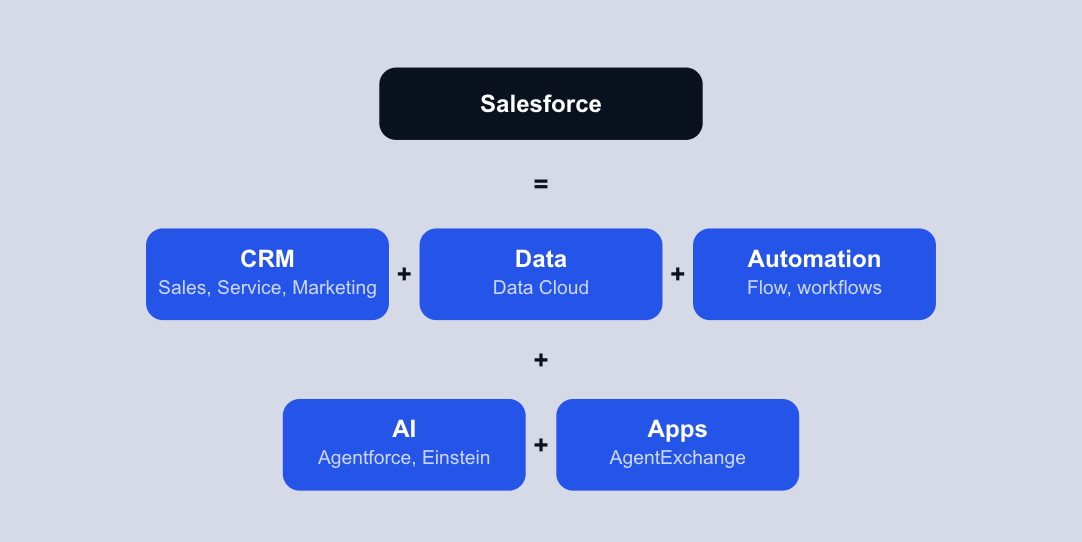
So Salesforce is more than a customer relationship management system. It’s an AI platform that helps different parts of a business work with the same customer data and processes. Its power comes from AI, real-time data, and automation.
What Is Salesforce Used For?
Customer data is all over the place. Teams use numerous tools in their work. And sales are torn between selling and updating records. How to keep up with all this and stay productive?
According to Salesforce’s 2026 State of Sales report, the average seller spends only 40% of their time selling, losing almost two full hours each week to manual data entry.
Salesforce CRM changes the state of affairs — it pulls sales, service, marketing, data, automation, and AI together.
Sales Cloud governs sales, Salesforce Service Cloud deals with customer cases, Marketing Cloud automates marketing, and Data Cloud connects customer data. Flow automates processes, while Agentforce adds AI agents. Work is in full swing. Let’s review how you can use Salesforce products to perform better.
What Does Salesforce Do?
Yes, we have already revealed the key areas related to Salesforce as well as its features. It’s high time to see what this CRM can do and how it can meet your needs with its products and services.
Manage and optimize sales with Sales Cloud
Sales Cloud, renamed as Agentforce Sales in 2025, is more than sales automation software that deploys AI agents at every stage of the sales cycle. In fact, it’s a business tool that can drive 30% more revenue. Plus, it can lighten sales reps’ workload — so they can focus on closing deals.
What are Salesforce Cloud features?
- Manage leads, accounts, and contacts
- Track the sales pipeline
- Better forecasting
- Automate routine tasks (follow-ups, reminders, and data updates)
- Speed up account planning
Refine customer service with Service Cloud
We‘re introducing another Salesforce product: Service Cloud. It simplifies how businesses interact with their clients through AI agents. This unified Salesforce platform gives service teams the tools to manage cases, handle customer requests, and improve service workflows. How can you apply Service Cloud?
- Automate routine support tasks and workflows
- Create self-service resources with Knowledge
- Use AI agents to interact with clients
- Track and improve customer service performance
Reach your audience swiftly with Marketing Cloud
The Salesforce platform that guides teams through every stage of the customer journey is Agentforce Marketing, formerly known as Marketing Cloud. Because it’s agentic, you can engage clients faster and adapt to their personal needs in real time. What can you do with Agentforce Marketing?
- Build and orchestrate customer journeys
- Design and automate marketing campaigns
- Segment audiences based on clients’ data
- Personalize content and customer interactions
- Engage customers across multiple channels
- Automate and optimize marketing activities
Unify your customer experience with Customer 360
Customer 360, formerly known as Data Cloud, brings Salesforce’s applications, customer data, and AI capabilities together on a unified platform. So businesses get a complete view of customers across sales, marketing, service, commerce, and other functions. All is done to deliver more connected, consistent experiences. What can you achieve with Customer 360?
- Unify customer data from different sources
- Create a complete view of customer interactions
- Connect sales, marketing, service, and commerce teams
- Improve data consistency and accessibility
- Personalize customer experiences across touchpoints
- Give employees and AI agents access to trusted customer data
Let automation do the heavy lifting with Salesforce Flow and MuleSoft
Salesforce does a good job at automation. Their Flow and MuleSoft help teams automate mundane tasks and repetitive processes.
For instance, businesses can robotise approvals, notifications, record updates, task assignments, and other operations. Plus, companies can automate workflows that span Salesforce and other platforms — ERP, finance, HR, and legacy systems. What else can you digitize?
- Update records automatically
- Assign tasks to the right team members
- Trigger actions based on specific events
- Streamline repetitive workflows
- Reduce manual data entry and administrative work
- Connect Salesforce with external systems
Build, customize, and extend Salesforce
You can make Salesforce work your way. This CRM is the backbone for building custom business applications. Teams can create tailored objects and Lightning apps and scale functionality with Apex. To meet requirements, they have to pass the Salesforce AppExchange security review.
If teams need to integrate with external systems, they can do this through Salesforce APIs that connect different apps. From AgentExchange, they can also add ready-made software solutions. Here's what you can build with Salesforce:
- Create custom objects and data models
- Build tailored Lightning apps
- Extend Salesforce with Apex
- Connect external systems through APIs
- Add third-party solutions from AgentExchange
- Develop applications around specific business needs
Bring AI into every workflow with Agentforce
Agentforce adds AI agents to Salesforce processes — so businesses can complete tasks faster, make teams more fruitful, and get more from their data. You can integrate AI agents directly into the applications and workflows your employees already use. What else can you do with Agentforce?
- Automate mundane tasks and workflows
- Support sales and customer service teams
- Offer employees AI-powered support
- Handle routine customer interactions around the clock
- Deploy AI agents across different business functions
- Extend AI-powered assistance across multiple channels
- Connect AI agents with existing Salesforce workflows
So it’s obvious that Salesforce offers a wide range of applications that matter for your business operations. And it’s great that you can also customize them to your needs and industry specifics, whether you work in tech, retail, or any other industry.
With Salesforce consulting, you can better understand how to build and scale your business around this CRM.
How Does Salesforce Work?
Picture this: a central hub connects customer data, business processes, automation, and AI, and they sync and interact. This is how Salesforce works.
Data → Processes → Automation → Insights → AI → Action
- Data. Salesforce CRM stores information about your processes — customer information, interactions, sales activity, service cases, and other data.
- Processes. Teams can rely on extracted data to govern operations across departments: sales, service, marketing, commerce, and more.
- Automation. It frees your employees from routine tasks. For example, Flow can update records, route requests, or trigger tasks without manual work.
- Insights. Salesforce converts your data into practical takeaways through reports and analytics.
- AI agents. Agentforce uses your business data and configures actions to assist employees or complete specific tasks.
So, Salesforce connects data with the tools teams need to understand, automate, and act.
What Are Core Salesforce Products?
Salesforce has different products for different business purposes. Instead of going through every product, here’s a quick way to see what each one does and when you might need it.
These products are designed to support each other to bring more to the table. For example, Sales Cloud can manage predictions, while Data 360 shares customer context. Tableau analyzes how your business performs, while Agentforce helps teams act, relying on insights from data.
What Makes Salesforce Different From a Basic CRM?
Salesforce and basic CRM: what’s the difference? Why do basic CRMs lag behind Salesforce?
A basic CRM is chiefly a place to store customer contacts, track deals, and manage sales activities.
Salesforce works as a complex ecosystem where businesses can connect CRM, data, workflows, integrations, apps, and AI – all in one landscape.
This difference between them matters as a business scales up. When a new process turns out to be more sophisticated, you may need an extra tool because a traditional CRM can’t handle it.
If you use Salesforce, you can extend it. You can integrate it with other tools and add automations. Plus, you can broaden capabilities or fuel your CRM with AI features.
In fact, we can compare a basic CRM to a toolbox, and Salesforce to a workshop. So see how it works in practice! A toolbox gives you the instruments you need to complete your tasks. A workshop provides you with the space to build, connect, and expand. As a result, Salesforce CRM grows together with your business.
What Are the Key Salesforce Benefits?
As you’re aware of Salesforce features and its use cases, it’s high time to figure out what advantages it can bring and the challenges it can address. Here are five practical benefits of Salesforce.
1. One view of customer data
How to see the full picture when customer data is spread across spreadsheets, emails, and different apps? Of course, this takes time and effort. And not all data can be considered.
Salesforce brings customer data into one shared view. Sales teams can see contact details, call notes, previous interactions, and customer activity. And the biggest bonus is that they don’t need to jump between different systems.
2. Automation of repetitive work
When your team does routine tasks- follow-up emails, notifications, and data entry by hand, they can be tiresome and boring.
You can save your employees’ time and resources, as Salesforce can automate these tasks, including your interactions with clients. Your employees don’t need to send a follow-up email, as Sales Cloud can do this automatically.
3. Actionable insights
From one side, it’s great to have so much data related to your customers and processes, but on the other hand, how can you rely only on the valuable ones? From one side, more data – more informed decisions; from another side, more data – a higher probability of data chaos. How do you find the balance and actionable insights?
Luckily, Salesforce can turn customer data into reports and dashboards, and you don’t need to plow through a ton of information. So, sales managers can track meetings and opportunities, while marketing managers can see email opens and clicks and how their campaigns perform.
4. Integration with other systems
When business apps don’t talk to each other, employees have to switch between systems to find what they need. Is it convenient? Nope! Does it influence their performance? Yes, in a negative way. Salesforce reports companies use more than 1,000 apps on average, but only 29% of them are integrated.
As a Salesforce integration partner, we know how our clients benefit while using this CRM. First, it connects them with existing business apps — ERP, supply chain systems, and more. Second, their teams access unified data instead of keeping information in separate silos.
5. AI-powered capabilities
Today, it’s difficult to find a team that doesn’t use AI. And those who decide on it strive to integrate it into their existing workflows. And that’s a great decision that adds up efficiency and better productivity.
Salesforce brings agentic, generative, predictive, and conversational AI into the CRM. AI in Salesforce is built-in via Einstein and Agentforce. It relies on both trusted CRM and external data to predict, generate, and run task-focused agents in the flow of work.
Is Salesforce Right for Your Business?
Salesforce can solve many business problems, but it’s not the right fit for every company. The key is to look at how complex your processes and customer data are. That’s why we’ve compiled a checklist for you to decide: Salesforce CRM or a simpler CRM.
Salesforce can make sense if:
- Your customer data is scattered across different tools.
- Your teams spend too much time managing processes manually.
- Several teams need access to the same customer information.
- You need to customize your CRM around your business processes.
- You need to connect multiple systems and apps.
- You want to add AI to your existing workflows.
Salesforce may be more than you need if:
- You only need a basic contact database.
- Your business processes are simple.
- You have a small number of users.
- You don’t need automation or integrations.
How Much Does Salesforce Cost?
One of the questions that businesses ask most frequently is: “What is Salesforce pricing?” In fact, pricing varies by product, edition, and number of users.
Salesforce doesn’t have one pricing model. The cost depends on the product and how you use it. There are three common models:
Salesforce also offers add-ons and usage-based features, such as AI and data credits. Many products are sold through annual contracts. So, there is no single Salesforce price. Your budget depends on which Salesforce products you need, how many people use them, and how much you use them.
How to Get Started With Salesforce
We’re almost at the finish line. Now let’s look at how to get Salesforce up and running and turn it into a system that supports your actual business needs. Here are the steps to follow.
Step 1. Define business goals and requirements
First, you need to understand what you want to achieve with Salesforce. So it’s a good idea to answer these questions:
- What business problems do you want to solve?
- Which processes take too much time?
- What do your teams need from Salesforce?
- How will you measure success?
Clear answers will help you choose the right Salesforce products and avoid paying for features you don’t need.
Step 2. Map current processes
Now, observe how your teams work today. Map the customer journey, data flows, and daily processes. Identify manual tasks, disconnected apps, duplicate data, and bottlenecks.
You’ll get a complete picture of where Salesforce can automate work and where it needs to integrate with other systems.
Step 3. Choose Salesforce products and design the architecture
At this stage, you pick the Salesforce products and features that match your business needs. Then, you plan how they will work together — data model, user access, workflows, integrations, and security.
The goal here is to build an architecture that works today but can also scale up with your business.
Step 4. Integrate data and systems
Salesforce rarely works alone. Next, connect it with the systems your teams already use — ERP, marketing platforms, accounting software, or communication tools.
You need to do this as part of the implementation, not as an afterthought. You should keep data connected and avoid creating another data silo.
Step 5. Configure and customize Salesforce
Now it’s time to turn the design into a working Salesforce environment. We configure standard features and customize the platform where your business needs something more specific.
This can include custom fields and objects, workflows, dashboards, permissions, apps, and automation.
Step 6. Test, train, and launch
Before going live, test the system with real business scenarios. Check whether data is accurate, workflows work as expected, and integrations exchange information correctly.
At the same time, train your teams so they know how to use Salesforce in their daily work. Once everything is ready, release your app.
Step 7. Optimize and scale up
Salesforce implementation doesn’t end at launch. As your business grows, your processes and needs will change too.
Review how teams use Salesforce, track results, collect feedback, and look for new ways to automate and improve the system. So you’ll get more value from Salesforce over time.
Why Noltic for Salesforce Development
Why choose Noltic to build and improve your Salesforce ecosystem? As a Salesforce Consulting Partner, we’ve delivered 160+ projects with a team of 76 certified experts. Our Salesforce services cover the full project lifecycle — from consulting and implementation and development to integration, data migration services, QA, and ongoing support.
As a Salesforce solutions provider, we’ve worked with companies across high tech financial services, healthcare, retail, professional services, and other industries. Our case studies and our products like Cloud File Uploader, CheckMy Number, Documate, and Tracky show how we help businesses refine their processes and get more from their Salesforce investment.
Not sure where Salesforce fits into your business? Noltic can help you assess your current processes, design the right Salesforce architecture, and turn the platform into a working business system.
FAQ
What is Salesforce in simple terms?
Salesforce is a cloud software that helps businesses manage customer data, relationships, and business processes, all in one place. It started as a CRM, but today it also offers automation, analytics, integrations, apps, and AI.
What is Salesforce mainly used for?
Salesforce use cases depend on the business function. Sales teams use it to track leads and opportunities. Service teams manage customer relationships. And marketing teams run campaigns. Plus, businesses can use it to automate routine tasks and connect Salesforce with other systems.
Is Salesforce a CRM?
Yes. Salesforce is a CRM, but it is more sophisticated than a traditional CRM. Along with customer relationship management, it offers tools for data, automation, analytics, integrations, apps, and AI.
How does Salesforce work?
Salesforce stores customer and business data in the cloud and offers a suite of tools to manage processes related to data. You can refine workflows, automate tasks, integrate other systems, and customize the platform to fit your business.
What are the main Salesforce products?
The main Salesforce products:
- Agentforce Cloud
- Service Cloud
- Agentforce Marketing
- Commerce Cloud
- Experience Cloud
- Data 360
- Revenue Cloud
- Financial Services Cloud
- Health Cloud
- Agentforce.
Of course, businesses don't need to use all of them. They can pick the products that match their needs and add more as they scale up.
What is Salesforce Agentforce?
Agentforce is Salesforce's platform for building and deploying AI agents. These agents can work with Salesforce data and tools to govern tasks, answer questions, and support both customers and teams.




How to get started with Salesforce
together