Salesforce Service Cloud Voice: What It Does, What It Costs, and How to Set It Up

Key Takeways
- Salesforce Voice (formerly Service Cloud Voice) integrates phone calls and all information related to them into a CRM.
- Agentforce Contact Center, Partner Contact Center with Salesforce Amazon Connect, or your existing provider — you can pick any of these telephony models.
- Salesforce Voice costs $50-200 per user per month, depending on the telephony model and number of included minutes. You’ll also need an Agentforce Service, Enterprise, or Unlimited license.
- Open CTI retires on February 28, 2028, and won't work for new orgs. It’s high time to plan the move to Salesforce Voice if you still rely on it.
Imagine this: a customer is calling you with an urgent request. Your agent answers but can’t give them an answer right away. The customer’s history is in Salesforce, while call details are in another system. The agent jumps between tools, and other customers keep waiting.
On top of that, after the call, your reps still have to record all details manually. And your managers can’t track how many calls agents process and how well they support clients. If you rely on Open CTI, there’s another issue not to miss: its retirement in 2028.
Salesforce Service Cloud Voice brings phone conversations into Salesforce. Reps can view customer records, read live transcripts, and manage calls and chats in one place.
Salesforce now calls it Salesforce Voice. It offers two editions: Partner Contact Center and Agentforce Contact Center.
So what does it do? What does it cost? And how to set it up? Let’s focus on this in our article.
What Is Salesforce Service Cloud Voice?
Service Cloud Voice is a contact center solution that links phone calls to Salesforce. This lets agents answer calls, view customer records, and manage cases from the same console. They don’t have to switch between the CRM and a separate phone system to get the job done.
Here’s how it works.
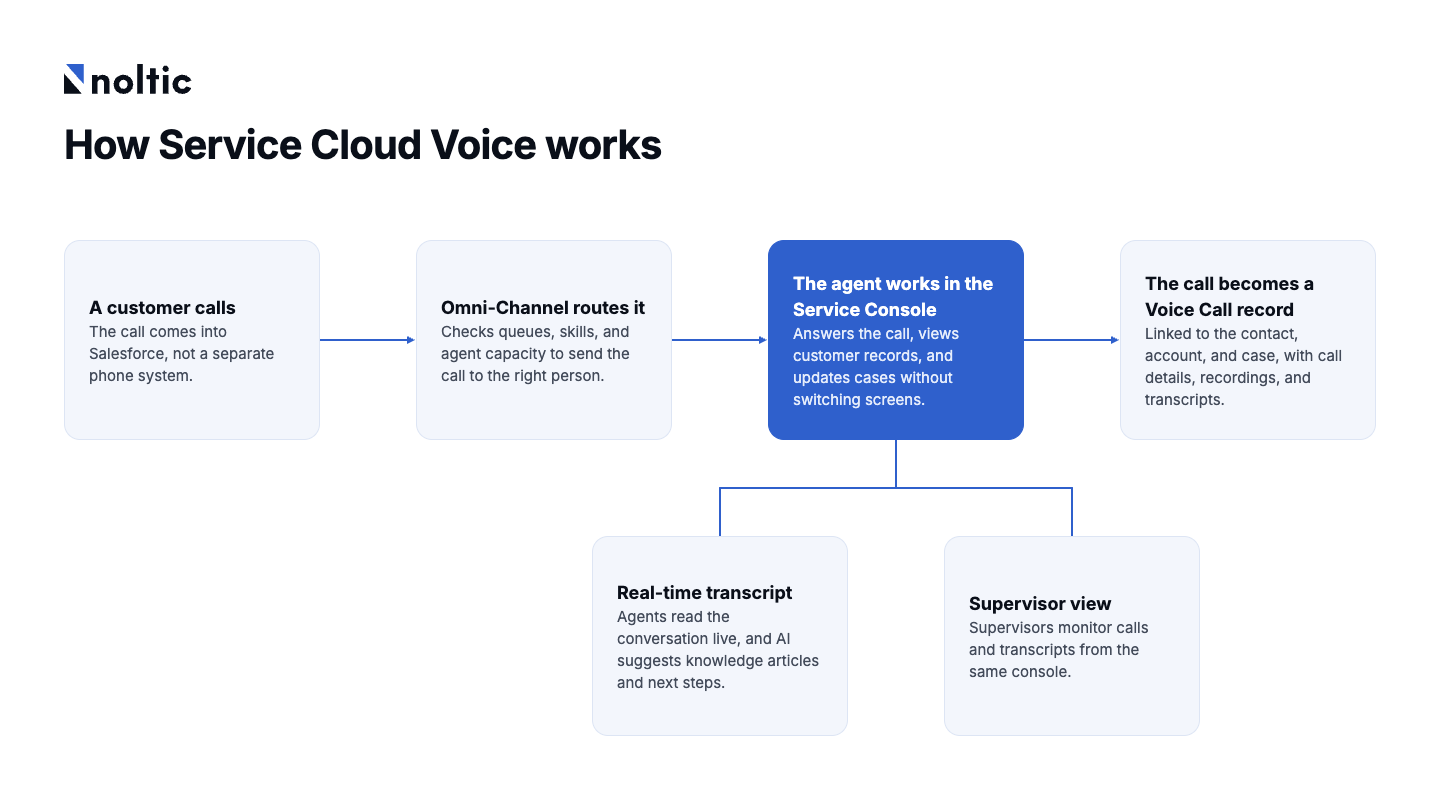
- Calls become records. Each call creates a Voice Call record related to the client’s contact, account, and case. That’s why call details, recordings, and transcripts are saved in one location, and agents can review the conversation when needed.
- Omni-Channel routes calls. For calls, chats, and emails, Salesforce uses the same routing system. This lets it check queues, skills, and agent capacity to route each request to the right audience.
- Transcripts appear in real time. Agents can read the conversation live. AI can suggest knowledge articles and next steps, so agents spend less time taking notes after the call.
- Everything happens in the Service Console. Agents can answer calls, view customer records, read transcripts, and update cases. All this is possible without switching screens. From the same console, supervisors can also monitor calls and transcripts.
Salesforce Voice vs. a CTI softphone: what’s the difference
How do a Salesforce CTI softphone and Salesforce Voice differ? CTI integrations add a softphone into the Salesforce console. So agents can click to call and see customer records pop up. But the phone system still works separately from Salesforce.
Calls are often logged as basic activities, and routing is in the phone system. As a result, this restricts how Salesforce uses call data for reports and AI.
Salesforce Voice relies on a different approach. Calls are a part of Salesforce. They follow its routing rules and connect with the same customer data as chats and emails. So agents and AI have more context to work with.
How Salesforce Voice Works: Three Telephony Models
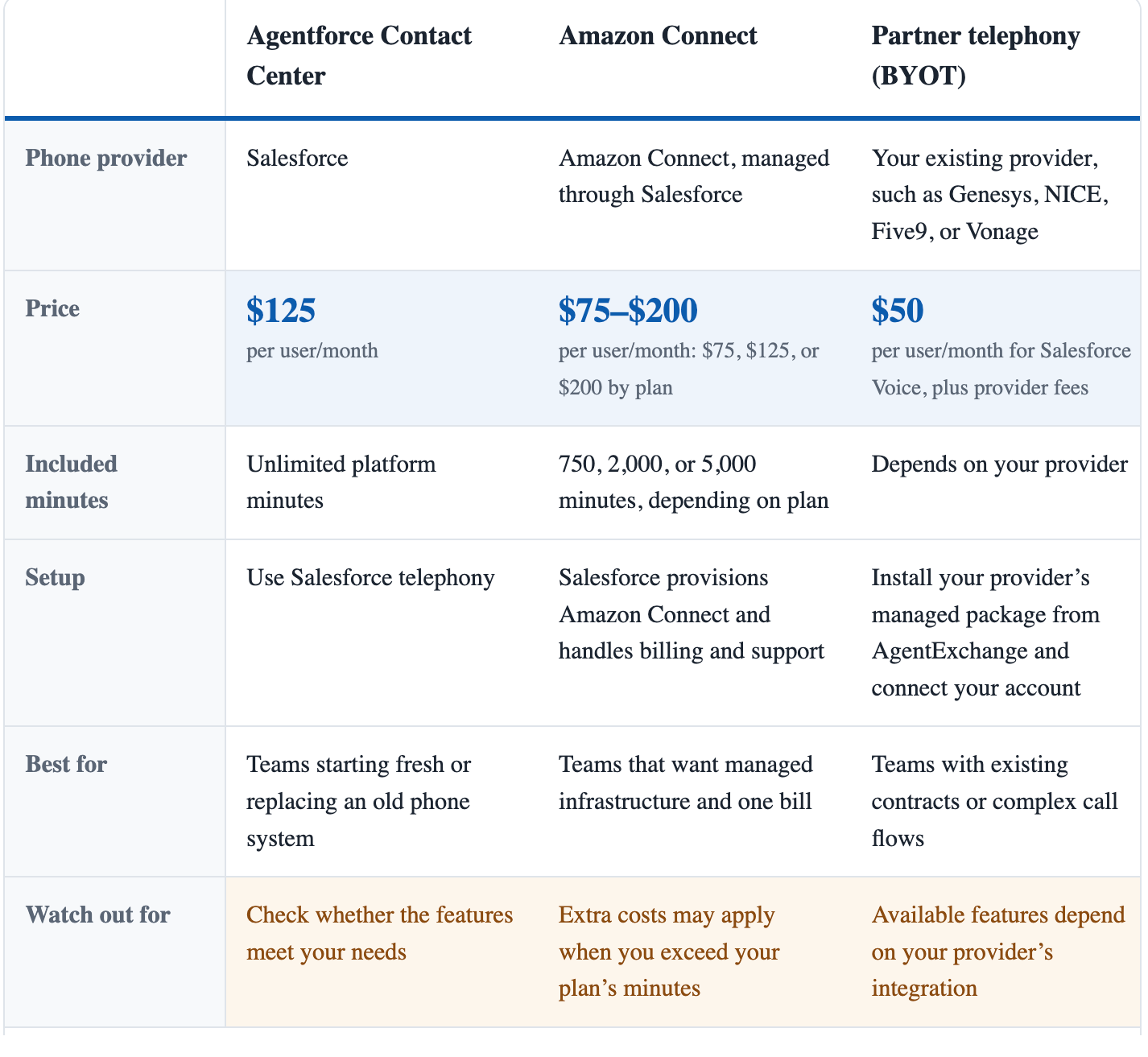
As we mentioned above, Salesforce Voice offers three options: Salesforce telephony, Amazon Connect, or your existing phone provider. The main differences are pricing, included minutes, and setup. Let’s focus on them to understand which one can suit your needs.
Which model fits your team?
Now, which model should you choose? Start with your current phone system, call volume, and team’s needs. Use this checklist to find the right fit.
- Starting fresh or replacing an old phone system? Choose Agentforce Contact Center.
- Keeping your current provider or complex call flows? Choose BYOT.
- Moderate call volumes and want one bill? Choose Amazon Connect.
- Handling high call volumes? Consider Agentforce Contact Center or compare Amazon Connect overage fees.
- Already using AWS and have the skills to manage it? Consider Amazon Connect.
Key Features of Salesforce Service Cloud Voice
Now it’s time to focus on key features of Salesforce Voice. What are they? And what do they bring to the table?
- Real-time transcription: Transcripts emerge on the agent’s screen as the customer talks. It’s automatically saved to the call record. Why is it convenient? Agents don’t waste time taking notes and can be sure that the case history stays complete.
- Omni-Channel routing: Calls, chats, emails, and messages go through one routing engine. So the system can evaluate queues and skills, and how busy agents are. So requests are always sent to the right person.
- Supervisor monitoring: Supervisors are more informed: they can follow live calls and read transcripts. If an agent needs assistance, they can ask before the call ends.
- Call recording: Recordings link to Voice Call records, transcripts, and cases. Teams can monitor talks for quality checks, training, or disputes without jumping between systems.
- AI next best actions: Einstein and Agentforce can suggest knowledge articles, replies, and next steps based on calls. They can also help agents with drafting case summaries. So issues are resolved swiftly.
- Service Cloud Voice analytics: Salesforce reports contain data ranging from call volume and wait times to call duration and agent performance. With Amazon Connect, Contact Lens can also analyze customer sentiment and conversations. Based on this data, it’s easier to detect issues and plan staffing.
- Direct numbers for sales reps: Sales reps get their own business numbers. That’s why customers can call them directly. Calls stay in Salesforce, not on personal phones.
Business Value of Salesforce Voice: Benefits for Your Contact Center
Now that you know the main features of Salesforce Voice and how they work, let’s look at the business value it can bring.
- Lower cost per contact. Live transcripts cut down the scope of note-taking and after-call work. Reps spend less time on admin tasks.
- Faster issue fixing. Customer history, open cases, and past conversations are all in one place. So reps can access them swiftly. Plus, AI is helpful with next steps.
- Better workload distribution. Omni-Channel routes calls, chats, and messages using the same rules.
- Better team performance. Supervisors use recordings and transcripts to coach reps and spot emerging issues.
- Faster onboarding. New reps learn one console instead of jumping between separate tools.
- Clearer reporting. Call records link to contacts and cases. So it’s possible to track voice alongside other service metrics.
- More flexibility. You can keep your current telephony provider or use Amazon Connect.
- A path to AI-powered support. Salesforce Voice lays the telephony foundation for Agentforce Voice.
Benefits by role
Agentforce Voice: AI Agents on the Phone
The work of your team can become easier than ever. And all this thanks to Agentforce Voice. You can trust phone calls to AI agents. Your clients don’t press buttons in an IVR menu — they just need to say what they want.
This is a win-win situation for both sides. How does this work? The AI agent analyzes the request. It finds customer data in Salesforce. And ta-da: it can check an order, reschedule an appointment, or update a case.
How Agentforce Voice relates to Salesforce Voice
The question you may ask: “How are Agentforce Voice and Salesforce Voice related?” In fact, both products work in sync and offer its advantages.
Salesforce Voice covers everything related to calls: connection, routes, records, and transcriptions.
Agentforce Voice adds the AI layer. It comprehends what the customer wants and decides what to do next.
You need Salesforce Voice to use Agentforce Voice, along with an Agentforce for Service license.
What it changes for your team
AI agents and humans work in a pair. AI agents can handle routine calls around the clock.
When a call needs a human, the AI hands it over through Omni-Channel. The agent gets the transcript and customer record to continue. The customer doesn’t have to repeat what they share with the AI agent.
Of course, who will handle the call depends on its volume and type. If it’s based on a predictable pattern, AI can resolve it without human help.
But if customers require judgment, negotiation, or empathy, Agentforce Voice may be more useful for triage than resolution.
For setup details, see Salesforce’s introduction to Agentforce Voice.
Salesforce Voice Pricing in 2026
Salesforce Voice pricing depends on your telephony model. Here’s what each option costs per user per month, billed annually, according to the official pricing page.
What you actually pay
The Voice license is an extra cost on top of an Agentforce Service Enterprise or Unlimited license (formerly Service Cloud), which costs about $175 or $350 per user per month.
You may also pay for extra minutes, transcription, analytics such as Amazon Contact Lens, and your phone provider’s fees.
Example: 50 agents on Enterprise
Amazon Connect and Agentforce Contact Center cost the same per agent in this example. The difference is the minutes: Amazon Connect includes 2,000, while Agentforce Contact Center offers unlimited platform minutes.
BYOT has the lowest base price, but you’ll need to add your provider’s fees.
N.B. Salesforce may offer discounts through negotiated contracts. That’s why you can use these figures as a starting point for your budget.
Open CTI vs. Service Cloud Voice: How to Plan Your Migration
If your team uses Salesforce Open CTI, it’s time to plan your next move. Don’t wait until Salesforce retires it to look for a replacement. A migration takes time, especially if you need to rebuild call routing, reports, and custom features.
In this guide, we’ll compare Open CTI with Salesforce Voice and walk you through the steps to make the switch.
Open CTI vs. Service Cloud Voice at a glance
5 steps to plan your migration
We want to help you prepare for the move to Salesforce Voice. Here are a few tips to help you get ready for migration.
- List your CTI dependencies: Start with what your current setup does. List screen pops, click-to-call, call logging, reports, and custom code. These are the things you’ll need to check and rebuild during migration.
- Choose your telephony model: Decide whether to keep your current provider through Partner Contact Center, move to Amazon Connect, or use Agentforce Contact Center. Your provider contract and renewal date can help you choose.
- Check your licenses and costs: Confirm your Agentforce Service edition and get the right Voice licenses for agents and supervisors. Check whether transcription and analytics will cost extra.
- Rebuild routing and reports: Set up queues and routing rules in Omni-Channel. Configure screen pops and rebuild reports and dashboards to use Voice Call records instead of Tasks.
- Test before switching: Keep Open CTI running while a small team tests Salesforce Voice. Compare call handling, data capture, and agent feedback. Once everything works as expected, move the rest of the team and retire Open CTI.
Our sincere recommendation: don’t wait until the last minute. It’s better to plan well ahead of the February 2028 deadline. Indeed, you have enough time to test the new setup and fix problems before switching.
How to Implement Service Cloud Voice: 4 Major Steps
So your support team is ready to manage calls in Salesforce. But first, you need to answer a few questions:
- Which phone system will you use?
- How will calls reach the right agents?
- Which Salesforce licenses do you need?
In addition, you should plan the implementation process. No doubt, a high-quality plan now can save you time and stress during setup.
Prerequisites
These are the essential conditions you should pay attention to get the ball rolling:
- Salesforce Enterprise or Unlimited edition with Agentforce Service.
- Lightning Experience. Service Cloud Voice doesn't work in Salesforce Classic.
- Omni-Channel enabled. Set up queues or skills-based routing to deliver calls to the right agents.
- Voice licenses. Make sure every agent and supervisor who needs Voice has the relevant license.
Setup phases
Now that you’ve decided about Salesforce phone integration and prepared for it in terms of editions and licenses, we can get moving.
Step 1. Plan your setup
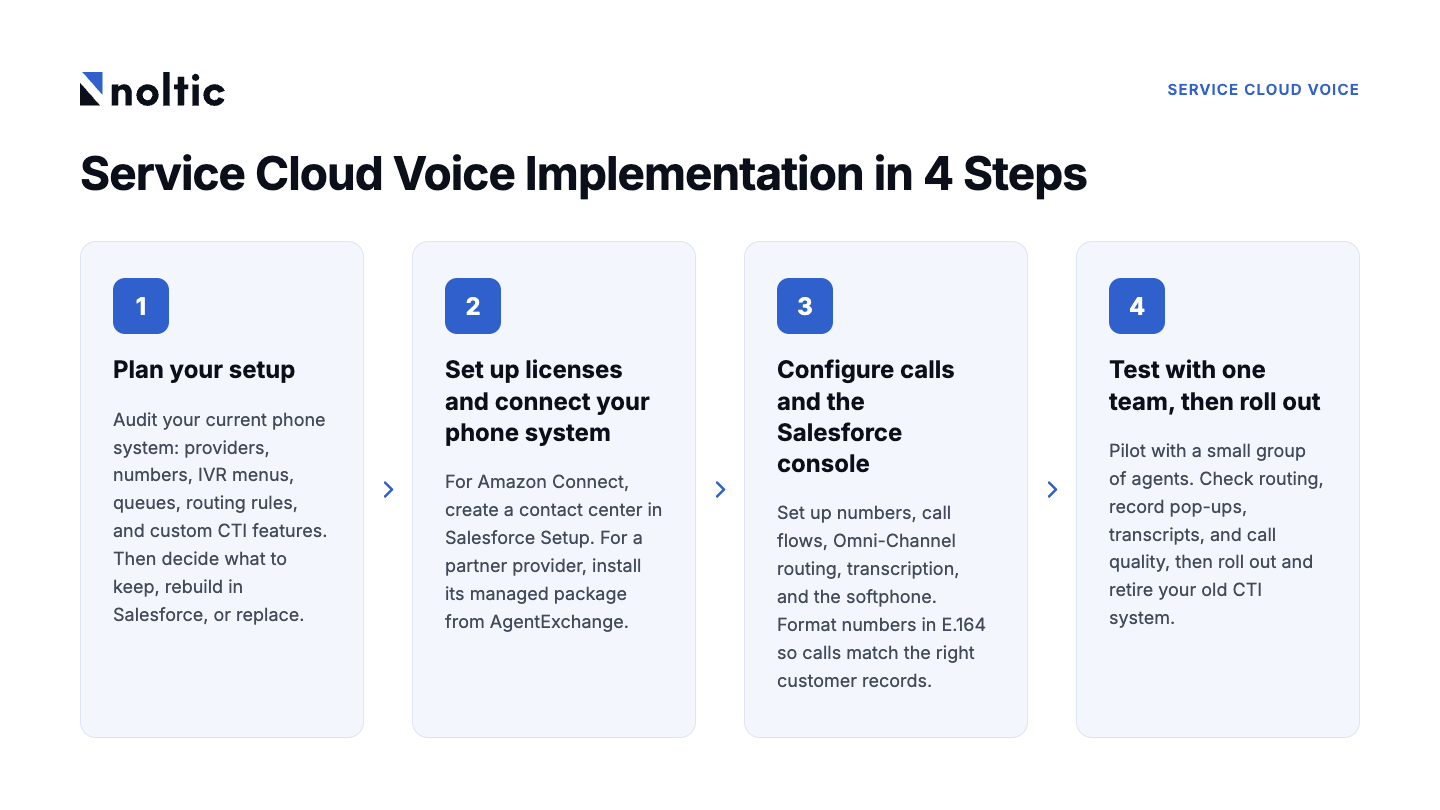
The goal here is to evaluate what you have to move to the next stage. That’s why you should start with your current phone system: your providers, phone numbers, IVR menus, queues, and routing rules. Include any custom CTI features you use. Why?
So you know how your team handles calls today. And you decide what to keep, what to rebuild in Salesforce, and what might need a different solution. You can also spot potential issues before setup begins.
Step 2. Set up licenses and connect your phone system
Now it’s time to connect your phone system to Salesforce. The steps depend on which telephony model you choose.
- Using Amazon Connect? Create a contact center in Salesforce Setup. Salesforce will provision the Amazon Connect instance for you.
- Using a partner provider? Install its managed package from AgentExchange and connect your account.
In both scenarios, make sure you have the relevant licenses before you kick off.
Step 3. Configure calls and the Salesforce console
Now, set up phone numbers, call flows, and Omni-Channel routing. Configure transcription, the softphone, and Voice Call page layouts. Make sure Salesforce can match incoming calls to the right customer records by standardizing phone numbers in E.164 format. CheckMyNumber, Noltic’s native Salesforce app, helps you validate and reformat existing numbers in bulk.
This is also where you connect calls to customer records. For example, when a customer calls, Salesforce can open their record on the agent's screen. You can also pass data from the IVR to Salesforce.
Step 4. Test with one team, then roll out
Don’t switch everyone over on day one. Start with a small group of agents and see how things go. Do calls reach the right people? Do customer records pop up? Are transcripts accurate and call quality good? It’s a good idea to compare the results with your old setup to see the dynamics.
Once everything runs flawlessly, you can involve the rest of your team and retire your old CTI system.
FAQs
What is Service Cloud Voice?
Salesforce Service Cloud Voice has another name now — Salesforce Voice. This service integrates phone calls, transcripts, customer data, and AI suggestions into the Salesforce console. This speeds up agents’ work since calls and customer information live in one place.
How much does Service Cloud Voice cost?
Salesforce Service Cloud Voice pricing starts at $50 per user per month with your own telephony provider. Amazon Connect plans cost $75, $125, or $200, depending on included minutes. For Agentforce Contact Center, you have to pay $125 per user per month. N.B.: All options above require Salesforce licences: an Agentforce Service Enterprise or Unlimited license.
Can I use Amazon Connect with Service Cloud Voice?
Yes, sure. Partner Contact Center, together with Amazon Connect, integrates your phone system with Salesforce. The license includes a set number of minutes, and Salesforce handles billing and support. But before you sign up, check the cost of extra minutes.
How do I set up Service Cloud Voice?
- You need Agentforce Service Enterprise or Unlimited, Lightning Experience, and Omni-Channel.
- You have to pick a telephony model and purchase the required licenses.
- In Setup, you can configure call routing, phone numbers, and transcription.
- It’s a great idea to start with a small pilot before releasing it to the whole team.
Is Service Cloud Voice the same as Salesforce Voice?
Yes, of course. Salesforce renamed Service Cloud Voice to Salesforce Voice. The telephony options are now called Partner Contact Center (with a partner provider) and Agentforce Contact Center (with Salesforce telephony).
When is Open CTI being retired?
Salesforce will retire Open CTI on February 28, 2028. New Agentforce Service orgs have been unable to use it since February 2026. Existing integrations will keep working until retirement. That’s why you should plan your move to Salesforce Voice, as you’ll need to rebuild routing, screen pops, and reporting.



Agentforce 2.0 new features overview
CheckMyNumber Lookup feature for real-time phone validation in Salesforce
together