HubSpot vs Salesforce: how to choose the right CRM for scale in 2026

CRM selection becomes a strategic decision once revenue teams grow beyond basic contact lists. The global CRM market continues to expand rapidly, with around 80% of organizations using CRM systems for sales reporting and automation, according to Grand View Research.
Salesforce remains the dominant vendor in the CRM space. It holds the largest share of the global CRM market and leads the category across business sizes for more than a decade, reports IDC. HubSpot is a major competitor, especially in the small and mid-market segment, serving hundreds of thousands of customers and growing as adoption rises.
Both platforms support core sales, marketing, and service functions. Choosing between HubSpot vs Salesforce often comes down to organizational complexity, future integration needs, and the ability to absorb system governance. Poor platform alignment is a frequent reason companies switch systems within a few years of deployment. Understanding where each platform excels helps reduce long-term risk.
HubSpot and Salesforce platform intent differences
Let’s look at the difference between HubSpot and Salesforce at a design level, so we can set the foundation for any HubSpot vs Salesforce comparison.
HubSpot platform intent
HubSpot is designed to reduce setup time and operational effort. The platform combines CRM, marketing, sales, and service into one system with limited configuration requirements.
The intent behind HubSpot is ease of use. In most HubSpot CRM vs Salesforce discussions, HubSpot assumes:
- Simple sales and marketing processes;
- Few internal dependencies;
- Minimal CRM administration.
Configuration relies on predefined options rather than custom logic. This approach supports HubSpot's ease of use and faster rollout.
In a Salesforce or HubSpot decision, HubSpot fits companies that value speed and simplicity over process control. That positioning explains why HubSpot appears frequently in recommendations for small and mid-size teams.
Salesforce platform intent
Salesforce is built as a configurable business platform. CRM is one part of a broader system that supports sales, service, marketing, analytics, and custom applications.
In any Salesforce vs HubSpot evaluation, Salesforce assumes:
- Defined or maturing processes;
- Shared data across teams or regions;
- Integration with other business systems;
- Ongoing governance.
Salesforce relies on architecture and configuration rather than defaults. That design explains the difference between Salesforce and HubSpot in long-term use.
Salesforce fits organizations that expect complexity and scale. In discussions about Salesforce's biggest competitors, HubSpot is often positioned as an alternative for smaller or less complex environments rather than a direct replacement at enterprise scale.
HubSpot vs Salesforce capabilities comparison
Both platforms cover core CRM needs, but the differences show up once processes, data volume, and team structure grow. Let’s take a closer look at HubSpot and Salesforce features.
1. Sales and pipeline management in Salesforce vs HubSpot
HubSpot capabilities
HubSpot focuses on simple and predictable sales motions. Teams work with standard pipelines that usually follow a single linear flow from lead to deal. Pipeline stages are easy to set up but offer limited flexibility when sales processes differ across teams or products.
Workflow automation covers basic needs such as task creation, deal updates, and email follow-ups. Sales reps can track emails, calls, meetings, and notes directly on the deal record, which works well for small teams that want visibility without heavy setup. For most inbound and SMB sales models, these features are enough to keep deals moving.
Salesforce capabilities
Salesforce supports multi-stage pipelines with different logic per team, product line, or region. One sales team can follow a short transactional flow, while another uses a long enterprise cycle with legal and procurement steps, all inside the same system.
Approval processes handle pricing exceptions, discounts, and contract terms, ensuring deals follow internal rules before moving forward. Territory and quota management allow sales leadership to assign accounts, track ownership, and measure performance across regions and roles. Advanced automation connects pipeline changes with tasks, notifications, forecasts, and downstream systems such as billing or service.
Salesforce handles complex sales structures more effectively, especially when multiple teams, regions, or approval layers are involved, and consistency matters across the entire sales organization.
Salesforce vs HubSpot features for sales
| Sales capabilities | HubSpot | Salesforce |
|---|---|---|
| Pipeline structure | Single or simple pipelines with limited stage logic | Multiple pipelines with different logic per team, product, or region |
| Sales process flexibility | Best for one consistent sales motion | Supports different sales motions in one org |
| Workflow automation | Basic workflows for tasks, updates, and follow-ups | Advanced automation tied to pipeline stages, roles, and outcomes |
| Email and activity tracking | Built-in email, call, and meeting tracking | Deep activity tracking connected to records, reports, and forecasts |
| Approvals | Limited approval handling | Native approval processes for pricing, discounts, and contracts |
| Territory management | Not designed for complex territory models | Full territory assignment and ownership rules |
| Quota management | Basic goal tracking | Quotas by role, region, and time period |
| Fit by sales complexity | Small teams and straightforward deals | Large teams with layered approvals and long sales cycles |
2. Data model and customization in HubSpot and Salesforce
HubSpot data model
HubSpot offers a simplified data model designed for fast setup and ease of use. Custom objects are available only on higher tiers, and even then, the structure is best suited for flat or lightly connected data. Relationships between records are limited, which can make it hard to reflect real business dependencies such as multiple contacts per account, shared ownership, or linked contracts and assets.
For teams with straightforward data needs, this approach keeps administration light. As processes grow more complex, teams often rely on naming rules, manual checks, or external tools to compensate for data model limits.
Salesforce data model
Salesforce is built around a fully customizable data model. Teams can create custom objects for any business entity and define complex relationships between them, including one to many and many to many links. This allows Salesforce to mirror how the business actually works rather than forcing processes into a fixed structure.
Validation rules and triggers enforce data quality at every step. Required fields, conditional logic, and automated checks prevent incomplete or incorrect data from entering the system. These controls become critical when many teams work in the same CRM or when data feeds reporting, billing, or compliance processes.
Data-heavy businesses usually require Salesforce to model real processes without workarounds.
Data model difference between HubSpot and Salesforce
| Data model and customization | HubSpot | Salesforce |
|---|---|---|
| Custom objects | Available only on higher tiers | Available on all enterprise plans |
| Data model flexibility | Limited and mostly flat | Fully customizable |
| Record relationships | Basic associations | Complex one-to-many and many-to-many |
| Data validation | Minimal built-in controls | Advanced validation rules |
| Automation of data changes | Limited | Triggers and logic on create, update, and delete |
| Fit by data complexity | Simple datasets and processes | Data-heavy and process-driven organizations |
3. Reporting and analytics in HubSpot vs Salesforce
HubSpot reporting
HubSpot is designed for quick visibility. Sales and marketing teams can build reports in minutes using predefined templates and simple filters. Dashboards are easy to configure and work well for team-level performance tracking, such as deals closed, activity volume, or campaign results.
However, cross-object analysis is limited. When reporting needs to combine multiple datasets such as deals, products, service tickets, and revenue history, the system can become restrictive. Advanced forecasting, multi-dimensional trend analysis, and consolidated executive reporting often require exports or external BI tools.
For growing teams, HubSpot reporting supports operational visibility but may not fully satisfy strategic management needs.
Salesforce reporting
Salesforce provides reporting built for both operational teams and executive leadership. Dashboards can combine data from sales, service, and custom objects, giving management a complete view of pipeline health, revenue trends, and team performance.
Forecasting tools allow leaders to analyze projected revenue by rep, region, product line, or time period. Trend reports show historical movement in pipeline stages, win rates, and revenue performance. Cross-system reporting connects CRM data with billing, marketing, or external systems when integrations are in place.
As organizations scale, reporting requirements often become a key factor in CRM decisions. Salesforce supports advanced analysis without forcing teams to move core data outside the platform.
Reporting and analytics comparison: HubSpot CRM vs Salesforce
| Area | HubSpot | Salesforce |
|---|---|---|
| Report setup | Fast and template-driven | Flexible with advanced configuration |
| Dashboard level | Team-focused dashboards | Executive and cross-department dashboards |
| Cross-object analysis | Limited | Advanced multi-object reporting |
| Forecasting | Basic revenue projections | Detailed forecasting by role, region, and product |
| Trend analysis | Basic time-based reports | Historical trend and pipeline movement analysis |
| Cross-system reporting | Often requires external tools | Native support through integrations and data modeling |
| Fit by reporting complexity | Operational reporting | Strategic and enterprise-level reporting |
4. Marketing capabilities of HubSpot versus Salesforce
HubSpot marketing features
HubSpot brings email marketing, forms, landing pages, and automation into one interface. Campaigns are easy to launch, and marketers can manage content, nurture flows, and lead scoring without technical setup. Attribution reporting connects campaigns to deals, and lifecycle tracking shows how contacts move from lead to customer.
The platform is especially strong for inbound marketing models where content, gated assets, and automated email sequences drive growth. For small to mid-sized teams, HubSpot keeps execution simple and centralized. As segmentation logic or channel complexity increases, customization can become limited.
Salesforce marketing
Salesforce Marketing Cloud is built for scale. It supports large datasets, complex segmentation rules, and high-volume messaging across email, SMS, push notifications, and advertising channels. Multi-channel customer journeys can adapt dynamically based on behavior, profile attributes, and engagement history.
Enterprise-grade segmentation allows marketers to combine transactional data, behavioral signals, and service history into highly targeted audiences. When integrated with Sales Cloud and Service Cloud, marketing teams gain a unified customer view that supports coordinated outreach across departments.
HubSpot works well for standard inbound programs. Salesforce Marketing Cloud fits complex marketing operations with high data volume, strict compliance requirements, and multiple engagement channels.
Marketing capabilities HubSpot vs Salesforce Marketing Cloud comparison
| Area | HubSpot | Salesforce (Marketing Cloud) |
|---|---|---|
| Core tools | Email, forms, landing pages, automation in one interface | Enterprise email, SMS, push, ads, and cross-channel orchestration |
| Ease of setup | Quick to launch campaigns | Requires structured setup and integration |
| Attribution | Simple lifecycle and campaign attribution | Advanced attribution across channels and customer touchpoints |
| Segmentation | Basic and rule-based | Enterprise-grade, multi-source segmentation |
| Data volume support | Best for small to mid-sized datasets | Designed for very large datasets |
| Multi-channel journeys | Primarily email-driven automation | Advanced dynamic journeys across multiple channels |
| Fit by marketing complexity | Standard inbound and lead nurturing programs | Complex global marketing operations |
5. AI features Salesforce vs HubSpot
Artificial intelligence plays a different role in each platform. One focuses on productivity and content support, while the other is built around data-driven automation embedded across the CRM.
AI HubSpot comparison
HubSpot AI is mainly designed to assist users directly in their daily work. It helps marketing and sales teams generate email copy, blog drafts, subject lines, and basic campaign content. Sales reps can use AI suggestions to summarize conversations or draft follow-up emails.
The platform also provides simple insights such as recommended actions or surface-level performance suggestions. These features improve speed and convenience, especially for smaller teams without dedicated analytics support. However, predictive depth and automation based on large structured datasets remain limited.
HubSpot AI works best as a productivity layer rather than a fully embedded decision engine.
Salesforce Agentforce AI comparison
Salesforce Agentforce is built around AI agents embedded across Sales Cloud and Service Cloud. Instead of only generating content, it supports structured decision-making inside CRM workflows.
Agents can assist with lead qualification, service case resolution, knowledge retrieval, and workflow execution. Predictive scoring evaluates leads and opportunities based on historical performance. Sales forecasting models analyze pipeline trends and historical data to support revenue planning.
Embedded analytics across Sales and Service Clouds allows AI to operate on unified customer records. Recommendations are based on structured CRM data, behavioral signals, and defined business logic. As data volume and process complexity increase, Agentforce becomes more accurate and reliable.
Salesforce Agentforce relies on structured data and scale to deliver consistent results across departments.
AI features of HubSpot and Salesforce comparison
| Area | HubSpot | Salesforce Agentforce |
|---|---|---|
| Primary focus | Content and productivity support | Embedded AI agents inside CRM workflows |
| Content generation | Email, blog, and campaign drafts | Available but not the core focus |
| Predictive scoring | Limited | Advanced lead and opportunity scoring |
| Sales forecasting | Basic projections | AI-supported forecasting based on pipeline data |
| Service support | Limited AI assistance | AI-driven case suggestions and resolution guidance |
| Analytics integration | Surface-level insights | Embedded analytics across Sales and Service Clouds |
| Data dependency | Works with smaller datasets | Designed for structured, high-volume CRM data |
| Fit by complexity | Small to mid-sized teams | Large organizations with complex processes |
6. Integrations and ecosystem: HubSpot Salesforce comparison
CRM rarely works alone. As companies grow, finance systems, support platforms, data warehouses, and industry tools must connect to the core system. Integration flexibility often becomes more important than initial ease of setup.
HubSpot ecosystem overview
HubSpot offers integrations with common business tools such as email platforms, accounting software, customer support systems, and marketing apps. The marketplace covers most standard SMB needs, and many integrations can be installed with minimal configuration.
For straightforward environments, this works well. When integration logic becomes more complex such as syncing custom objects, handling multi-step workflows, or managing large data volumes, technical limits can appear. Deep system orchestration or heavy middleware layers are not HubSpot’s primary strength.
HubSpot fits organizations with a relatively simple tech stack and limited cross-system dependencies.
Salesforce ecosystem
Salesforce is designed for multi-system environments. Its integration marketplace includes thousands of applications across industries. Beyond prebuilt connectors, Salesforce supports custom APIs, event-driven integrations, and middleware platforms.
For enterprise architectures, Salesforce can connect CRM data with ERP systems, billing platforms, marketing engines, external databases, and industry-specific applications. The platform is built to support complex data flows, bidirectional syncing, and large transaction volumes without changing the core structure.
As integration needs expand, Salesforce allows companies to extend their ecosystem rather than replace it.
Integration needs increase over time, and Salesforce is built to support that growth without rebuilding the core setup.
Integrations and ecosystem comparison: Salesforce vs HubSpot
| Area | HubSpot | Salesforce |
|---|---|---|
| Marketplace size | Broad set of common integrations | Extensive enterprise and industry marketplace |
| Ease of setup | Quick plug-and-play integrations | Prebuilt and custom integrations |
| API flexibility | Basic API access | Advanced APIs and event-driven architecture |
| Middleware support | Limited | Strong support for middleware and enterprise integration tools |
| Multi-system orchestration | Suitable for simple stacks | Designed for complex, multi-system environments |
| Scalability of integrations | Works for moderate data volumes | Handles large-scale data exchange and synchronization |
| Fit by ecosystem complexity | Small to mid-sized tech stacks | Enterprise architectures with many connected systems |
HubSpot vs Salesforce pricing in 2026
Pricing is a common trigger for a HubSpot vs Salesforce comparison, but license cost alone rarely reflects the real spend over time. The two platforms price very differently, which affects predictability as teams scale.
Salesforce CRM pricing model
In a Salesforce vs HubSpot pricing discussion, Salesforce pricing is user-based with additional cost for clouds, add-ons, and custom work.

Source: https://www.salesforce.com/small-business/pricing/
HubSpot CRM pricing model
In a HubSpot vs Salesforce pricing review, HubSpot pricing is tier-based and scales primarily with contacts.
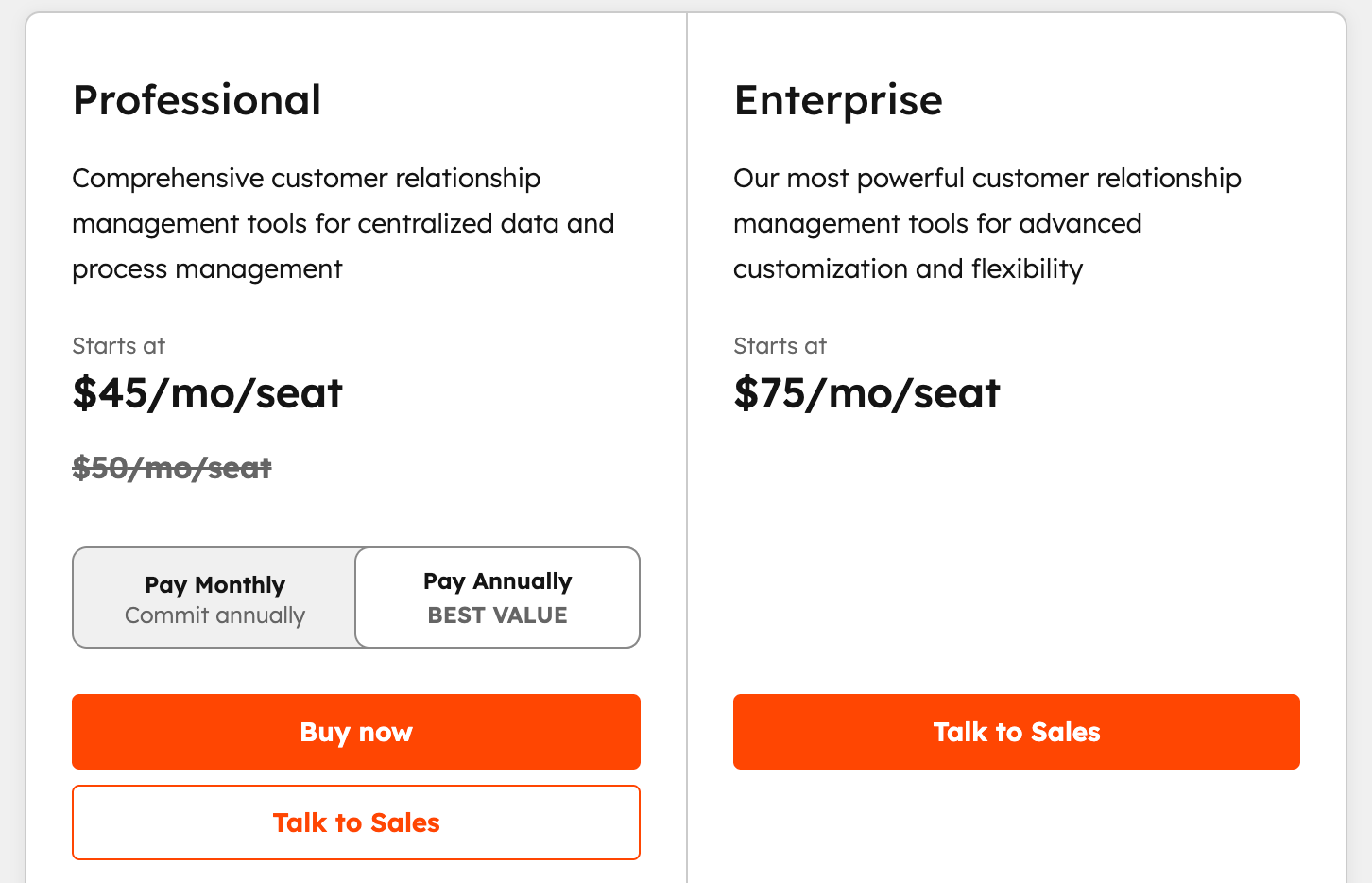
Source: https://www.hubspot.com/pricing/smart-crm?term=annual
Why Salesforce customization matters at scale
Salesforce customization is often the deciding factor in long-term success. In many HubSpot CRM vs Salesforce decisions, Salesforce is chosen for flexibility, but implemented with minimal configuration. That gap leads to low adoption and rework.
Customization is the biggest difference between Salesforce and HubSpot
When you compare Salesforce and HubSpot, the default features look similar at first. Both platforms support leads, opportunities, and campaigns. The gap appears when processes stop being standard.
The key difference between Salesforce and HubSpot is your control over data and workflow.
HubSpot limits customization to protect HubSpot ease of use. Salesforce allows deep customization to support:
- Unique sales stages and approval logic;
- Complex data relationships;
- Industry-specific workflows;
- Regulatory and security requirements.
This flexibility explains why Salesforce is often chosen when companies reassess their platform in a long-term HubSpot vs Salesforce comparison 2026 planning cycle.
Why Salesforce customization increases long-term value
Salesforce customization matters when CRM becomes a system of record.
Typical scenarios include:
- CRM data feeds finance, billing, or fulfillment;
- Multiple teams rely on shared customer data;
- Reporting drives executive and board decisions.
In these cases, standard configurations are not enough. Salesforce supports custom objects, automation, and integrations that HubSpot does not handle well. This capability gap often becomes clear during a HubSpot Salesforce comparison after initial growth.
Customization risks without an experienced Salesforce partner
Salesforce customization is powerful, but it is not forgiving.
Common issues delivery teams see:
- Over-customized objects that slow adoption;
- Automation built without governance;
- Reporting logic that breaks after process changes.
These risks explain why Salesforce is discussed differently from Salesforce biggest competitors. The platform itself is rarely the problem. Poor design decisions are.
Marketing complexity highlights the customization gap
The difference is especially visible in marketing.
In a Salesforce Marketing Cloud vs HubSpot comparison:
- HubSpot covers standard inbound marketing with minimal setup;
- Salesforce Marketing Cloud supports complex, multi-channel programs.
Marketing Cloud requires data modeling, integration, and journey design. These are customization-heavy tasks. Without experience, costs and timelines increase quickly.
How Noltic approaches Salesforce customization
At Noltic, our team focuses on Salesforce customization that supports adoption and scale, not complexity for its own sake.
Developers and architects work with:
- Clear data models;
- Governance-first automation;
- Reporting designed for decision-making;
- Integrations aligned with future growth.
Here is what Noltic brings to the table:
- 150+ successfully completed Salesforce projects;
- 96 Salesforce-certified professionals;
- 410+ Salesforce certifications;
- 8 Salesforce architects;
- 5-star ratings on AppExchange and Clutch.
Noltic’s Salesforce services include:
- Salesforce consulting and solution architecture;
- Salesforce implementations and migrations;
- Salesforce integrations with ERP, finance, and data platforms;
- Managed services and long-term Salesforce support.
When customization should influence your platform decision
Customization should be a deciding factor when leaders:
- Compare HubSpot and Salesforce for long-term use;
- Expect process complexity to increase;
- Plan multi-system architectures.
In these situations, Salesforce delivers more value when implemented correctly.
Final perspective
Salesforce customization is not optional at scale. It is the reason companies choose Salesforce over HubSpot in mature HubSpot versus Salesforce evaluations.
Customization creates value only when guided by experience. Noltic helps companies design Salesforce platforms that support growth, reduce risk, and remain usable long after go-live.
FAQ: HubSpot vs Salesforce
What is the main difference between HubSpot and Salesforce?
The core difference between HubSpot and Salesforce is platform intent. HubSpot is built to minimize setup effort and administrative overhead. Salesforce is built to support complex processes, data models, and integrations. HubSpot favors speed and simplicity. Salesforce favors flexibility and long-term control. The difference becomes more visible as teams, data, and systems grow.
Is HubSpot better than Salesforce for small businesses?
In many small business scenarios, HubSpot vs Salesforce comes down to operational capacity. HubSpot is often the better choice when teams are small, sales cycles are simple, and there is no dedicated CRM administrator. Salesforce can work for small businesses, but only when there is a clear need for customization or future scale.
When does a company typically outgrow HubSpot?
Companies usually revisit a HubSpot vs Salesforce comparison when reporting becomes unreliable, sales structures become more complex, or integrations are required. Growth in contact volume, multiple pipelines, regional teams, or custom data models often exposes HubSpot limitations.
Which platform is easier to use: HubSpot or Salesforce?
In most Salesforce vs HubSpot evaluations, HubSpot is easier to use immediately after setup. Salesforce usability depends on how well the system is designed. With proper configuration, Salesforce can match usability, but without it, users experience friction. Ease of use in Salesforce is a delivery outcome, not a default feature.
How do HubSpot and Salesforce compare on pricing over time?
In HubSpot vs Salesforce pricing discussions, HubSpot costs scale with contact volume and feature tiers. Salesforce costs scale with users, products, and customization. HubSpot often appears cheaper early on. Salesforce tends to be more predictable as organizations scale and data volumes increase.
Can HubSpot and Salesforce be used together?
Yes. Many organizations run HubSpot and Salesforce together. HubSpot commonly supports marketing, while Salesforce serves as the system of record for sales and service. Successful setups require clear data ownership, field mapping, and sync rules. Poor integration design often leads to reporting issues.
Which CRM is better for complex reporting and analytics?
When teams compare Salesforce and HubSpot, Salesforce consistently supports more advanced reporting. It handles complex object relationships, forecasting models, and executive dashboards. HubSpot reporting works well for standard metrics but struggles with cross-team and cross-process analysis.
How does Salesforce Marketing Cloud compare to HubSpot?
In a Salesforce Marketing Cloud vs HubSpot comparison, the difference lies in scale and complexity. HubSpot fits inbound marketing with moderate data volumes. Salesforce Marketing Cloud supports large datasets, advanced segmentation, and multi-channel journeys. It requires specialist setup and ongoing management.
Does Salesforce require customization to be effective?
Yes. Salesforce delivers value through configuration and architecture. In many HubSpot CRM vs Salesforce projects, companies underestimate the need for customization. Without it, Salesforce feels complex and slow. Proper customization aligns Salesforce with real workflows and improves adoption.
Is Salesforce too complex for mid-size companies?
Salesforce is not inherently too complex for mid-size companies. Complexity usually comes from poor design decisions. With proper planning, Salesforce supports growth without forcing replatforming. Many mid-size organizations choose Salesforce to avoid future migrations.
Which platform is better for long-term growth?
For long-term growth, Salesforce or HubSpot depends on future business complexity. HubSpot fits early growth stages with simple processes. Salesforce supports growth across teams, regions, and systems. Long-term value depends on planning, not just platform choice.
How should companies decide between HubSpot and Salesforce?
The best HubSpot vs Salesforce comparison starts with business processes, data needs, and growth plans. Feature lists and license costs matter less than how the platform will be used in two to three years. Companies that plan for future complexity avoid costly rebuilds later.


.webp)

How to migrate from HubSpot to Salesforce

Salesforce Marketing Cloud vs Mailchimp
together